Introduction
Machine breakdowns happen without warning. Rush orders arrive mid-shift. A supplier delays a key component and the entire week's schedule falls apart. For manufacturers running on spreadsheets or basic MRP, each disruption triggers hours of manual rescheduling — and the result is rarely a schedule the shop floor can actually execute.
According to a 2024 Siemens study, large industrial plants experience an average of 25 unplanned downtime incidents and lose 27 production hours per month. That burden lands squarely on the production planner's desk.
Advanced Planning and Scheduling (APS) systems are built specifically for this complexity. Unlike MRP or ERP scheduling modules, APS uses constraint-based logic to generate schedules that reflect real shop floor conditions: actual machine availability, shift calendars, setup times, and job dependencies.
This guide covers:
- What APS is and how it differs from MRP/ERP scheduling
- How constraint-based scheduling logic works
- Core APS capabilities and what to look for
- Measurable benefits manufacturers see in practice
- How to evaluate whether your shop is ready for one
Key Takeaways
- APS generates executable production schedules using finite capacity and constraint-based logic — not theoretical plans
- Unlike MRP, APS accounts for machine availability, shift calendars, setup times, and routing dependencies simultaneously
- What-if scenario simulation lets planners respond to disruptions in minutes, not hours
- APS complements ERP rather than replacing it, providing the finite scheduling layer that ERP modules can't deliver
- Ease of use is often underweighted in APS evaluations, but it determines whether the system gets used daily or abandoned
What Is an Advanced Planning and Scheduling (APS) System?
APS is a software approach that simultaneously plans and schedules production using constraint-based logic and optimization algorithms. The key word is executable: Gartner's definition of Detailed Manufacturing Scheduling specifies that these systems model finite capacity and operational constraints — routings, batch sizes, dependencies, material flows — producing ready-to-execute schedules at execution granularity from seconds to weeks.
APS doesn't just tell you what to make. It tells you exactly when, on which machine, in what sequence — accounting for every constraint standing between your plan and the finished part.
Planning vs. Scheduling — A Critical Distinction
These two terms get used interchangeably, but they describe different layers of decision-making:
- Production planning — medium-to-long-term decisions about what to produce, in what volume, and when. Strategic and aggregate.
- Production scheduling — short-term, operational decisions about which machine runs first, which operator handles which job, in what sequence, and at what exact time.
A production plan might say: manufacture 500 units of Product A this week. The schedule determines which machine runs the first operation, how setup time between Job A and Job B is minimized, and what happens when the second-shift operator calls out sick.
APS bridges both layers — consuming plan-level demand and translating it into an operationally feasible, constraint-aware schedule.
Where APS Fits in the Manufacturing Technology Stack
APS sits between two existing systems most manufacturers already run:
- ERP/MRP — feeds demand, order, inventory, and routing master data into APS
- MES — receives the finalized, executable schedule from APS and tracks shop floor execution
APS acts as the translation layer between strategic business plans and actionable shop floor execution. ERP modules handle order management and demand — they were never built to sequence jobs across finite machine capacity. That gap is exactly what APS fills, whether deployed as a standalone scheduling tool or integrated into a broader stack.
How APS Works: Finite Capacity and Constraint-Based Scheduling Logic
The foundational concept separating APS from traditional planning tools is finite capacity scheduling. Standard MRP and many ERP scheduling modules use infinite capacity assumptions — they calculate work-center loads without considering whether the required capacity actually exists.
The result is a plan that looks executable on paper but breaks down the moment it hits the shop floor.
As ETH Zurich defines it, finite loading considers capacity from the start and does not permit overloads. When work would exceed available capacity, start or completion dates move — or the sequence changes — rather than creating an impossible plan.
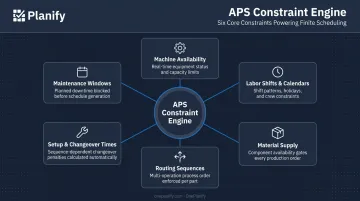
APS takes this further by evaluating all real-world constraints simultaneously before generating a schedule:
- Machine availability and work center capacity
- Labor shifts, overtime rules, and calendar exceptions
- Material supply and inventory availability
- Production routing sequences and operation dependencies
- Setup and changeover times between jobs
- Maintenance windows and planned downtime
How the system sequences work across those constraints depends on your operational priority — which is where scheduling direction comes in.
Forward and Backward Scheduling
APS systems typically support two scheduling directions, each suited to different goals:
- Forward scheduling — starts from the earliest available capacity and sequences jobs forward. Used when maximizing machine utilization is the priority, or when establishing realistic available-to-promise dates.
- Backward scheduling — starts from a due date and works backward through each operation to determine when work must begin. Used when on-time delivery is the primary goal, anchoring the schedule to customer commitments.
OnePlanify's Planify engine supports both modes within the same finite constraint framework — meaning the schedule respects setup times, shift calendars, routing dependencies, and real capacity regardless of which direction is used.
Choosing the right scheduling direction still leaves one problem unsolved: what happens when the plan changes mid-shift? That's where scenario simulation becomes essential.
What-If Scenario Simulation
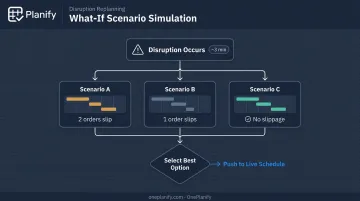
A key APS capability is the ability to model multiple production scenarios before committing to a change.
Planify's "Pretend Mode" is a direct implementation of this. When a machine goes down or a rush order arrives, the planner can run three different response scenarios in approximately three minutes — seeing which orders slip and by how much for each option — before pushing any change to the live schedule.
Instead of spending hours rebuilding a schedule after every disruption, planners evaluate options, see the downstream impact of each, and choose the least-damaging path before a single job moves.
Core Capabilities of an APS System
Modern APS systems share a set of capabilities that define their value on the shop floor. Here's what to expect from a well-built system:
Dynamic Rescheduling
When a disruption occurs — machine breakdown, material delay, priority change — a capable APS replans the entire schedule in seconds while preserving every setup, shift, and dependency constraint. No manual rebuild required.
Sequencing Optimization
APS algorithms prioritize and sequence jobs to minimize changeover time, reduce total production cycle time, maximize on-time-in-full delivery, and prevent bottlenecks. OnePlanify models exact sequence-dependent setup times between jobs: the transition from Job A to Job B might require 45 minutes of re-tooling while Job A to Job C takes 15.
That distinction matters. Most ERP and spreadsheet-based schedules ignore setup times entirely — which is why a schedule appearing 85% utilized on paper often runs at 60% in practice. APS makes changeover a first-class scheduling constraint so utilization numbers become operationally honest.
ERP and MES Integration
A well-integrated APS pulls live order, routing, and work center data from ERP systems and feeds completed schedule data back for floor execution. OnePlanify currently integrates with Epicor, SYSPRO, IQMS/DELMIAWorks, Global Shop Solutions, JobBOSS, Infor CloudSuite, Odoo, NetSuite, and SAP Business One via CSV, API, or database read patterns.
Ease of Use
Historically, APS complexity has been a major adoption barrier for smaller and mid-sized manufacturers. OnePlanify was designed specifically to close that gap: finite scheduling delivered with a spreadsheet-familiar workspace, browser-based with no IT project required, and operational within weeks rather than months.
Key Benefits of APS for Manufacturers
Operational Benefits
The shop floor improvements from APS adoption center on closing the gap between planned and actual performance:
- Better machine utilization by eliminating the paper-versus-reality gap that infinite capacity scheduling creates
- Shorter lead times through optimized job sequencing and reduced idle time between operations
- Fewer scheduling conflicts from routing dependency enforcement and shift-aware calendaring
- Minimized setup and changeover waste through sequence-dependent grouping of compatible work orders
- Faster response to disruptions — replanning in seconds rather than hours of manual rescheduling
A 2023 SME and Laserfiche survey of 300+ manufacturing professionals found 62% reported delays related to throughput, equipment effectiveness, or capacity utilization. These are exactly the operational gaps APS is designed to close.
Business and Customer-Facing Benefits
Those shop floor gains — shorter lead times, better throughput — translate directly into what customers experience:
- Higher on-time delivery rates, anchored to real capacity rather than optimistic estimates
- Improved customer satisfaction and repeat business through consistent, reliable delivery commitments
- Lower operational costs — reduced overtime, less inventory carrying cost, fewer expediting fees
- Confident order acceptance based on actual available capacity data, not gut feel
When a customer calls with an urgent order, a planner with APS can model the impact immediately: which existing jobs get displaced, by how much, and whether the expedite is worth accepting. Instead of promising a date and hoping for the best, the planner can give a real answer — or push back with data to back it up.
Strategic Benefits
At the business level, APS delivers advantages that accumulate as volume grows:
- Data-driven scheduling decisions that reduce dependence on individual expertise and tribal knowledge
- Faster response to market changes — accepting new orders or rebalancing capacity without days of manual analysis
- Better alignment between production capacity and business goals
- A foundation for growth that doesn't require hiring additional scheduling specialists as volume increases
APS vs. ERP and MRP: What's the Difference?
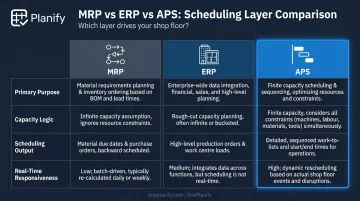
MRP, ERP, and APS all touch production planning — but they solve fundamentally different problems, and confusing them leads to gaps on the shop floor.
- MRP calculates material needs from demand, generating planned orders and purchase requirements. It runs on infinite capacity assumptions and can't produce executable schedules. Setup times, shift availability, and real-time disruptions are outside its scope.
- ERP manages business-wide operations: finance, procurement, inventory, HR, and order management. Most ERP scheduling modules share MRP's infinite capacity logic — too high-level to handle sequence-dependent setups, shift-level calendaring, or granular disruption replanning.
- APS pulls master data and order information from ERP and MRP, then applies finite capacity and constraint logic to produce a schedule the shop floor can actually run. It converts business plans into executable job-level sequences.
| MRP | ERP | APS | |
|---|---|---|---|
| Primary Purpose | Material requirements | Business operations management | Production scheduling |
| Capacity Logic | Infinite | Typically infinite | Finite |
| Scheduling Output | Planned orders | High-level production plan | Executable job-level schedule |
| Real-Time Responsiveness | Low | Low | High |
Signs Your Shop Floor Needs an APS System (and What to Look For)
Signs It's Time to Move Beyond Spreadsheets
If several of these describe your current operation, APS is worth serious evaluation:
- Planners spend hours manually rescheduling after every disruption — machine breakdown, rush order, or labor shortage
- On-time delivery is inconsistent, and the root cause is often the schedule itself rather than execution
- Some machines run constantly while others sit idle — a classic sign of poor constraint modeling
- Your scheduling tool cannot account for setup and changeover times, so the schedule on paper doesn't match what the floor can run
- Scheduling decisions rely more on individual planner experience than on system-generated data
- Accepting or declining a rush order requires multiple hours of analysis rather than a few minutes of scenario modeling
What to Look For When Evaluating APS Systems
When comparing systems, weight these criteria:
- Does the system use true finite capacity logic, or does it run on infinite assumptions with capacity alerts bolted on after the fact?
- Can it handle sequence-dependent setup times, shift calendars with exceptions, multi-operation routing dependencies, and disruption replanning at the same time?
- Can planners model disruptions and compare outcomes before committing changes to the live schedule?
- Does it connect to your existing ERP platform, and what's the implementation timeline and cost?
- Will your planners actually use it daily, or will it require a dedicated scheduling specialist to operate?
That last question is routinely underweighted. Complex APS systems that require weeks of training often go underutilized. Planners fall back to spreadsheets because the system is too difficult to operate under daily time pressure.
OnePlanify's Planify addresses this directly: browser-based finite scheduling with full-board replanning in seconds, no IT project required, and onboarding included with the subscription. It targets job shops, machine shops, and high-mix manufacturers across the US that have outgrown spreadsheets but aren't sized for a six-figure enterprise APS rollout.
Frequently Asked Questions
What is an advanced planning and scheduling system?
APS is software that uses constraint-based logic and optimization algorithms to generate realistic, executable production schedules. Unlike basic planning tools, it accounts for machine capacity, labor availability, shift calendars, material supply, and setup times simultaneously — producing a schedule the shop floor can actually run.
What is the difference between ERP and APS?
ERP manages broad business operations (finance, inventory, procurement, order management) with limited scheduling capability built on infinite capacity assumptions. APS is designed specifically for finite-capacity production scheduling at the job and operation level. The two complement each other: APS pulls order and routing data from ERP, then produces the executable shop floor schedule ERP cannot.
What is the most commonly used scheduling system?
Smaller manufacturers most commonly rely on spreadsheets or basic MRP modules built into their ERP. Dedicated APS software is more prevalent in mid-to-large manufacturers, but adoption is growing as high-mix, complex production environments expose the limits of spreadsheet scheduling. Cloud-based SaaS options have made APS increasingly accessible to smaller operations.
What are the main components of an APS system?
The three core components are: demand planning (estimating future production volumes), production planning (aligning capacity with business objectives), and production scheduling (detailed execution planning that assigns jobs to specific machines, operators, and time slots based on real constraints). Most manufacturers interact primarily with the scheduling layer.
Can APS software integrate with my existing ERP system?
Most modern APS systems integrate with major ERP platforms, pulling order, routing, and work center data and feeding finalized schedules back for floor execution. Planify, for example, integrates with Epicor, SYSPRO, SAP Business One, NetSuite, Odoo, and several others via CSV, API, or database read patterns. Always verify connector support for your specific ERP version during the evaluation process.