Introduction
Running a shop floor means managing machine capacity, shift changes, material availability, and customer due dates — simultaneously, every day. When something slips, the whole production sequence can unravel fast.
A master schedule is the planning tool that makes this coordination manageable. It translates customer demand into a sequenced, capacity-aware production plan that purchasing, production supervisors, and management can all work from.
The term "master schedule" gets used loosely in manufacturing. Many shop floors treat it as a glorified work order list or a spreadsheet of weekly targets. That gap between what a master schedule is and how it actually gets used explains a lot: the expediting calls, the missed shipments, the operators standing idle while machines wait for materials.
This guide covers:
- What a master schedule actually is at the shop floor level
- What it must include to be functional
- How to build one from scratch
- Where most teams go wrong — and how to fix it
Key Takeaways
- A master schedule defines what gets produced, on which resources, and in what sequence — across a defined planning horizon.
- It operates above the work order level, translating demand into capacity-constrained production windows.
- Core inputs: confirmed orders or forecasts, machine capacity, setup times, shift schedules, and lead times.
- Without finite capacity logic, master schedules produce plans the floor cannot execute.
- Frozen near-term zones and weekly review cycles keep the schedule stable enough for the floor to trust it.
What Is a Master Schedule for Shop Floor Managers?
The Master Production Schedule (MPS) is a time-phased plan that specifies which products or components must be produced, in what quantities, on which resources, and by when. It is the authoritative planning document connecting demand to shop floor execution.
According to ASCM's CPIM content manual, master scheduling involves creating and maintaining independent-item schedules, supporting customer order promising, and coordinating inventory, backlog, and time fences. The MPS answers what to make and when across your planning horizon — and holds every function accountable to that answer.
What the Master Schedule Is Not
Two documents often get confused with the master schedule:
- Production schedule: Operates beneath the master schedule, translating it into day-level sequencing of work orders across specific machines and work centers.
- Project schedule: A general project management tool with no capacity constraints or manufacturing logic — not a substitute for shop floor planning.
The master schedule sits between high-level sales planning and granular floor execution. It answers what and when at the job/work-center level; the production schedule answers exactly which machine, in what order, starting at what time.
The MPS as a Single Source of Truth
When the master schedule is working, every function operates from the same reference:
- Purchasing knows when materials are needed
- Supervisors know which jobs are assigned to which work centers
- Management can make accurate delivery commitments to customers
CIPS confirms that the MPS drives the entire MRP system, drawing on forecasts, customer orders, production capacity, and work priorities. An inaccurate master schedule doesn't just create floor confusion: errors cascade into material ordering, inventory levels, and labor planning across the entire operation.
Why the Master Schedule Is Critical on the Shop Floor
Shop floors place specific demands on planning that informal methods can't meet at scale: shared machines, sequential operations, setup-dependent changeovers, shift handoffs, and multiple simultaneous order streams.
Without a valid master schedule, the default is firefighting. Expediting becomes the primary scheduling tool, operators wait on materials, machines sit idle between runs, and late deliveries accumulate.
Deloitte's research on dynamic scheduling found that traditional scheduling requires manual disruption detection and longer data-collection cycles, which restrict real-time optimization. Among manufacturers who invested in dynamic scheduling approaches, survey respondents reported a 95% increase in on-time deliveries — a survey association rather than a controlled study result, but a directionally consistent one.
A concrete example of what better scheduling produces: NIST MEP reported in 2025 that Stainless Works reduced lead time from 12–14 weeks to 5 weeks after correcting ERP routings and applying forward scheduling at its welding bottleneck — with $250,000 in increased or retained sales and $50,000 in cost savings reported.
Why Spreadsheet-Based Scheduling Breaks Down
Spreadsheets fail on shop floors not because planners use them wrong, but because the tool itself can't model what the floor requires:
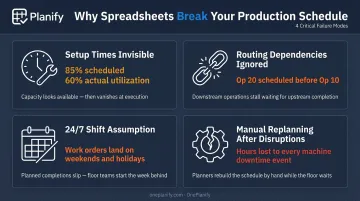
- Setup times are invisible. A schedule showing 85% utilization on paper may run at only 60% in reality — because changeover time is never modeled. Switching from Job A to Job B may take 45 minutes; Job A to Job C, only 15. A spreadsheet can't distinguish between the two.
- Routing dependencies can't be enforced. Nothing stops a planner from accidentally scheduling Op 20 before Op 10 completes. Across dozens of work orders, this breaks down regularly — and foremen start ignoring the published schedule.
- Shift calendars are assumed to be 24/7. Spreadsheets and many ERP modules schedule as if the floor never closes, landing jobs on weekends, holidays, or skeleton-crew third shifts.
- Replanning after disruptions takes hours. When a machine goes down, every affected work order must be manually re-sequenced — often with constraints dropped just to get something out the door.
Finite scheduling tools like OnePlanify's Planify address these gaps directly — modeling setups, shift calendars, and routing dependencies without the manual overhead of maintaining them in a spreadsheet.
What a Shop Floor Master Schedule Must Include
Time Horizon and Time Buckets
The master schedule must define a planning horizon — typically 4–12 weeks for most job shops — broken into time buckets (daily or weekly). Shorter buckets give more precision but require more frequent updates. Weekly buckets work for most SMB manufacturers; daily buckets make sense when jobs are short and the mix changes rapidly.
Items, Quantities, and Due Dates
Each entry in the master schedule should specify:
- The work order or item to be produced
- The quantity required
- The required completion date tied to a customer order or replenishment trigger
Finite Capacity Constraints
This is where most master schedules fail. Manufacturing.net's analysis of finite vs. infinite scheduling explains the consequence of infinite loading clearly: assuming tasks can start whenever capacity is available creates infeasible schedules, high WIP, long cycle times, and unpredictable delivery.
The master schedule must account for:
- Machine-specific availability (not just total available hours)
- Setup and changeover time between jobs
- Concurrent workload across work centers
Resource and Labor Inputs
Ignoring crew availability turns a master schedule into an aspirational document:
- Shift schedules per work center (1st, 2nd, 3rd shift configurations)
- Planned maintenance windows and downtime allowances
- Operator skill assignments where relevant
- Holiday and overtime authorization rules
Task Dependencies and Sequencing
Many production operations have upstream/downstream dependencies. A part must be machined before it can be assembled. The master schedule must reflect these sequences — otherwise, the floor receives a plan that is physically impossible to execute.
Scheduling Horizon Locks (Frozen Zones)
The near-term schedule should be stabilized — typically 1–2 weeks, depending on your lead times and cost of change — while the outer horizon remains flexible. Research from Tang and Grubbstrom confirms that frequent MPS changes reduce productivity, while an overly long frozen period harms service and inventory performance. The right freeze length is plant-specific.
Managing all of these constraints — setup sequences, shift limits, routing dependencies, frozen zones, and disruption replanning — is where spreadsheet-based scheduling breaks down. OnePlanify is built specifically to handle this complexity without burdening planners with manually reconciling every constraint across dozens of open work orders.
How to Build a Shop Floor Master Schedule Step by Step
Step 1: Gather and Validate Demand Inputs
The master schedule begins with demand: open sales orders, forecasted demand, and replenishment triggers. The quality of everything downstream depends on the accuracy of these inputs.
For managing demand uncertainty:
- Use time-phased buckets — firm orders in the near horizon, forecasts in the outer horizon
- Apply safety stock logic for high-mix, high-uncertainty environments
- Define frozen vs. flexible zones so near-term commitments don't shift daily
Don't start building the schedule until demand inputs are validated. Inaccurate demand data cascades into every downstream step — misallocated capacity, missed due dates, and reactive replanning that consumes the time you were trying to save.
Step 2: Map Available Capacity Against Demand
Rough-Cut Capacity Planning (RCCP) is the check between stated demand and available production capacity. ASCM defines it as reviewing the bill of resources to determine capacity requirements and identify key resources needed to support the MPS.
How to run RCCP:
- Identify your key work centers (typically 2–4 capacity-constraining resources)
- Calculate gross available hours per shift for each
- Subtract planned downtime and setup time to get net capacity
- Compare net capacity to demand in each time bucket
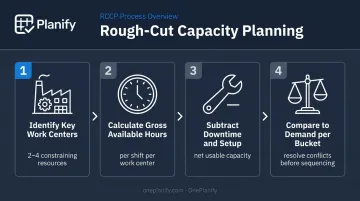
RCCP is a high-level feasibility check, not a detailed schedule. If demand exceeds net capacity, resolve the conflict before sequencing individual jobs.
Siemens' 2024 study found that large plants experience an average of 27 lost hours per month from unplanned downtime — which means realistic capacity calculations must include downtime allowances, not just shift hours.
Step 3: Sequence and Prioritize Production Orders
Once capacity is confirmed feasible, sequence jobs on constrained resources. Common sequencing rules:
| Rule | When to Apply |
|---|---|
| Earliest due date (EDD) | When on-time delivery is the priority metric |
| Similar setup grouping | When changeover time is a major capacity consumer |
| Shortest processing time | When queue length and WIP are primary concerns |
| Priority override | For high-value or contractually critical orders |
For most job shops, a combination of EDD and setup similarity produces the best results — you protect delivery performance while minimizing re-tooling losses.
Step 4: Build in Setup Times, Shift Changes, and Maintenance Windows
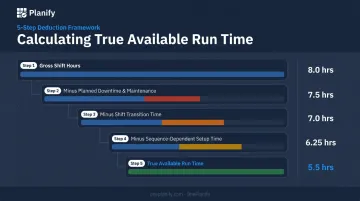
Many schedules fail because they are built in net production hours without accounting for time that isn't productive. To calculate realistic run time per job:
- Start with gross available shift hours
- Subtract planned downtime and scheduled maintenance
- Subtract shift transition time (handover, startup, cleanup)
- Subtract setup and teardown time per job, specific to the preceding job
- The remainder is your true available run time
This step is where finite scheduling tools provide the most visible return. Manually maintaining sequence-dependent setup matrices across dozens of work centers in a spreadsheet is where planners either simplify (and produce unrealistic schedules) or spend hours they don't have.
Step 5: Publish, Communicate, and Establish a Review Cadence
A master schedule that lives in one planner's head — or buried in a shared drive — fails on the floor. Make it visible, keep it current, and hold a weekly scheduling meeting with the right people in the room.
Who should be in the room:
- Production supervisor
- Materials/purchasing representative
- Production planner
Each session should cover the same core agenda:
- Review previous week's adherence
- Confirm upcoming week's schedule is executable
- Process change requests against the outer horizon
- Flag any near-term constraints before they become emergencies
The near-term horizon (1–2 weeks) should be locked except for genuine exceptions. Changes requested outside that window go into the flexible zone and are incorporated in the next formal review.
Key Factors and Common Pitfalls in Shop Floor Scheduling
The Variables That Most Affect Schedule Accuracy
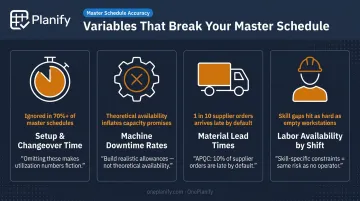
- Setup and changeover time — Underestimating or omitting these is the single most common reason a schedule looks executable on paper and fails on the floor. If your master schedule doesn't model sequence-dependent changeover, your utilization numbers are fiction.
- Machine downtime rates — Planned downtime can be scheduled around; unplanned downtime cannot. Build realistic downtime allowances into capacity calculations rather than assuming theoretical availability.
- Material lead times and supplier reliability — APQC benchmarks median supplier on-time delivery at 90%. That means 10% of orders are late by definition. A master schedule that assumes 100% supplier reliability will fail 10% of the time before the floor does anything wrong.
- Labor availability by shift — Skill-specific constraints matter. Scheduling a complex setup on a shift without a qualified operator produces the same failure as scheduling with no operator at all.
The Infinite Scheduling Trap
The most persistent misconception: if hours are available on paper, production will happen as planned. Real shop floors require finite scheduling logic. Treating available shift hours as interchangeable productive capacity — ignoring setups, routing constraints, and concurrent workloads — produces plans that operators and foremen learn to ignore.
The result is missed shipments, unplanned overtime, and reactive expediting that consumes planning bandwidth while solving problems that good scheduling would have prevented.
Planning at the Wrong Level of Detail
The master schedule should sit at the job/work-center level — not at a generic weekly target level, and not at a minute-by-minute machine sequence level. Both extremes are common mistakes:
- Too high: "We need to produce 500 units this week" with no resource assignment tells the floor nothing actionable.
- Too granular: A minute-by-minute machine sequence built manually in a spreadsheet is impossible to maintain and will be stale within hours of any disruption.
When teams try to solve finite scheduling complexity in spreadsheets, they end up with planners spending hours maintaining a schedule that's already outdated by the time it's published. OnePlanify is built specifically for this gap — finite capacity scheduling that accounts for setups, shift constraints, and disruptions without requiring a dedicated analyst to keep the plan current.
Failing to Protect the Near-Term Horizon
Constant last-minute changes to the master schedule create floor confusion, increase setup costs, and undermine crew confidence in the plan. When operators know the schedule changes daily, they stop relying on it.
The discipline required: freeze the short-term horizon and manage changes in the outer horizon. This requires organizational agreement that the schedule is a commitment, not a suggestion — and that changes inside the frozen zone require a deliberate decision, not a default.
Conclusion
A shop floor master schedule translates demand into a sequenced, capacity-aware production plan that purchasing, production, and management can all rely on. When it works, delivery commitments are accurate, material arrives on time, and the floor runs without constant firefighting.
That outcome depends on the operational detail covered in this guide — what the schedule must include, how to build it, and where it typically breaks down. None of the underlying concepts are complicated. What separates reactive shops from those that consistently hit delivery targets is the discipline to maintain realistic capacity data and hold the near-term horizon firm. Do that, and the schedule stops being a document people ignore and starts being the source of truth the floor actually runs on.
Frequently Asked Questions
What is included in a master schedule?
A shop floor master schedule includes items to be produced, quantities, required completion dates, machine and labor capacity constraints, setup and changeover times, and shift schedules. It carries more operational detail than a general project timeline because it must reflect what the floor can actually execute, not just what needs to get done.
What does a master scheduler do?
A master scheduler translates demand signals (sales orders, forecasts, and replenishment triggers) into a time-phased, capacity-checked production plan. They coordinate between sales, purchasing, and production, managing change requests against the planning horizon and keeping schedule accuracy intact through regular review cycles.
What is the difference between a master schedule and a production schedule?
The master schedule operates at a higher planning level, defining what to produce, when, and in what quantities across a planning horizon. The production schedule is the detailed, short-term sequencing of specific jobs and work orders on specific machines and work centers, derived from the master schedule.
How often should a shop floor master schedule be updated?
Most shop floors review and formally update the master schedule weekly. A frozen near-term zone (typically 1–2 weeks, depending on lead times and cost of change) provides stability, while the outer horizon is adjusted as demand or capacity conditions change.
What is finite scheduling and why does it matter on the shop floor?
Finite scheduling builds the production plan using actual, constrained capacity, accounting for machine availability, setup time, and concurrent workloads across work centers. Infinite scheduling assumes unlimited capacity and produces plans that are often physically impossible to execute, leading to missed shipments and reactive expediting.
How do equipment setups and shift changes affect the master schedule?
Setup and changeover time reduces net available production hours; ignored, it causes the schedule to consistently overestimate what the floor can deliver. Shift transitions create handover gaps that count as non-productive time, and both factors need to be modeled explicitly in the master schedule.