A production scheduling board is a visual or digital tool that maps which jobs are assigned to which machines or workstations, in what sequence, and when, across the entire shop floor. For job shop managers, it's not optional infrastructure — it's the difference between controlled execution and constant firefighting.
This guide covers what a scheduling board is, why job shops need one, how it works in practice, and when a manual board can no longer keep up.
Key Takeaways
- A scheduling board gives managers real-time visibility into job status, machine queues, and workload across all workstations
- Job shops deal with variable routings, custom orders, and frequent setups — complexity that generic scheduling tools consistently fail to handle
- An effective board shows job priority, resource assignments, routing dependencies, and capacity constraints in one shared view
- Physical boards work for very small shops but break down fast when job volume, shift changes, or disruptions increase
- When manual boards can't keep up, finite scheduling software built for job shops is the practical next step
What Is a Production Scheduling Board?
A production scheduling board is a centralized representation of all active work orders in a job shop — showing each job's status, assigned machine or operator, operation sequence, and expected completion window. It gives everyone on the floor, and in management, a single source of truth for what should be happening, on which machine, and in what order, at any given time.
How It Differs from Related Tools
Three tools often get lumped together, but each serves a distinct purpose:
- Master Production Schedule (MPS): High-level, time-bucketed, usually lives in the ERP. It answers what needs to be built over the coming weeks, not how the floor will actually run tomorrow.
- Gantt chart: A planning visualization showing task durations over time. Useful for communicating a plan, but not inherently updated when the floor changes.
- Scheduling board: An active, operational dispatch tool used daily on the floor. It reflects live conditions — machine queues, job status, operator assignments — and is updated as reality shifts.
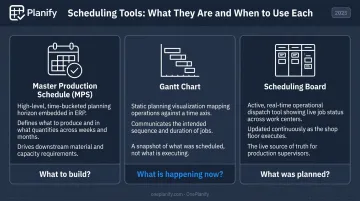
Where an MPS or Gantt chart captures intent, the scheduling board reflects what's actually happening — making it the tool that drives daily floor decisions.
Why Job Shops Need a Production Scheduling Board
The Core Scheduling Challenge
In a job shop, every order may follow a completely different path through the floor. Job A goes to the lathe, then milling, then inspection. Job B skips the lathe entirely and goes straight to grinding. Job C needs a specialized operator and a two-hour setup before the first cut.
NIST's foundational survey on job shop scheduling describes this as a resource allocation problem across a collection of tasks with potentially conflicting objectives: minimizing tardiness, balancing utilization, managing work-in-process, and maximizing throughput, often simultaneously. Verbal handoffs, whiteboards updated once a day, and gut-feel sequencing don't address that complexity. They don't fail gradually, either — they collapse suddenly, usually when the shop is at its busiest.
A 2024 review in the European Journal of Operational Research classifies the flexible job-shop scheduling problem as NP-hard, meaning the complexity scales faster than any informal method can keep up with.
What Goes Wrong Without a Board
Without a scheduling board, the same failure modes repeat across job shops of every size:
- Jobs pile up at bottleneck workstations while other machines sit idle
- Operators pull the wrong job next because there's no visible queue priority
- Rush orders get inserted without any visibility into downstream impact
- Managers spend their shift firefighting rather than planning the next one
- Customer delivery promises get made based on intuition, not actual capacity
NIST's documentation of Lynn Welding identifies lower on-time delivery, higher overtime, and excessive expedited orders as the documented cost categories of production scheduling breakdowns. These aren't theoretical risks; they're real operational outcomes with measurable cost.
The On-Time Delivery Stakes
On-time delivery is where the consequences of poor scheduling become visible to customers. Modern Machine Shop's 2017 Top Shops benchmark found that top-performing machining shops achieved 95% on-time delivery compared to 90% for other surveyed shops, with lead times of 20 versus 25 days respectively. That 5-point delivery gap and 5-day lead time difference represent real competitive separation — and scheduling discipline is a meaningful factor in sustaining it.
How a Production Scheduling Board Works in a Job Shop
At a high level, the board ingests work orders, maps each operation to an available machine in priority sequence, surfaces conflicts or gaps, and gets updated as jobs progress, machines go down, or new orders arrive.
What feeds into the board matters as much as the board itself: work orders with routings, machine availability, operator shifts, setup times, material readiness, and customer due dates. Inaccurate or missing inputs are the most common reason scheduling boards stop working.
Step 1: Capture and Prioritize Work Orders
Every active and incoming job must be entered with:
- Routing: the full sequence of operations (Op 10 → Op 20 → Op 30)
- Run time per operation: not just the job total, but per workstation
- Due date: hard customer commitment or internal target
- Priority tier: standard, expedited, or hot
Without this baseline, sequencing decisions become arbitrary. A due date without operation-level start and finish times tells the floor nothing about when to act.
Step 2: Assign Jobs to Machines and Workstations
Dispatching rules — FIFO, EDD (earliest due date), SPT (shortest processing time), and Critical Ratio — provide the logic for sequencing jobs through workstations. Each rule optimizes for a different outcome:
| Rule | Logic | Best For |
|---|---|---|
| FIFO | First in, first out | Perceived fairness, simple queues |
| EDD | Earliest due date first | Minimizing late deliveries |
| SPT | Shortest processing time first | Clearing WIP quickly |
| CR | Time remaining ÷ work remaining | Balancing urgency and workload |
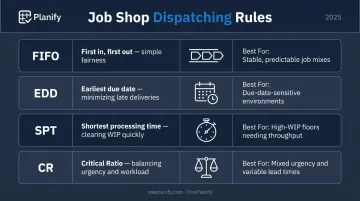
In practice, job shops rarely use a single rule. A job due tomorrow may need priority over a shorter job, even if SPT suggests otherwise. The board makes these tradeoffs visible instead of leaving them to individual judgment.
Step 3: Update and Adjust in Real Time
A scheduling board only holds value if it reflects actual floor conditions. The update cadence should follow two rhythms:
- Shift-start review: What's the queue at each workstation? Any overnight exceptions?
- Exception-triggered updates: Machine breakdown, operator absence, material delay, rush order arrival — each triggers an immediate board adjustment
A board updated once per day is a historical record, not a scheduling tool.
Key Elements of an Effective Job Shop Scheduling Board
Job Identification and Routing Visibility
Each entry on the board should show:
- Job number/work order ID
- Current operation and next operation in sequence
- Assigned machine or workstation
- Position relative to due date
Without routing visibility, operators can't prepare for what's coming next — and jobs arrive at workstations before the upstream operation is finished.
Machine and Workstation Queues
The board should display jobs waiting at each workstation in priority order. Operators need to know what to pull next without asking a manager. Unsorted queues are a leading cause of wrong-job-first errors. Not negligence — just an information gap.
Capacity and Load Indicators
An effective scheduling board shows whether each workstation is overloaded, balanced, or underutilized for the current planning window. This distinction matters:
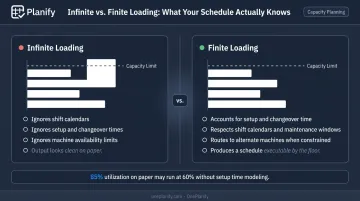
- Infinite loading schedules work without checking actual available capacity. It looks clean on paper but is rarely executable.
- Finite loading respects real capacity limits, shift calendars, and setup time, producing a schedule the floor can actually run.
Finite capacity scheduling explicitly reserves setup, run, and teardown time on actual machines and can account for shifts, maintenance windows, and alternate machines. A schedule showing 85% utilization on paper may run at 60% in reality if setup time isn't modeled.
Status and Exception Flags
Jobs behind schedule, waiting on material, or at risk of missing due dates should be visually differentiated: color codes, flags, or status indicators that surface problems at a glance. An undifferentiated board forces manual scanning — which means problems get found late, if at all.
Common Issues and Misconceptions
"A Scheduling Board Is Just a Whiteboard"
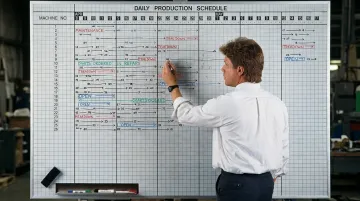
Physical boards work for very small shops — think three to five machines with low job volume and a single shift. The moment any of those conditions change, the limitations surface fast:
- Updates don't propagate: changing a job's priority on the board doesn't update the queue at downstream workstations
- No conflict detection: two jobs assigned to the same machine during overlapping windows aren't flagged
- No audit trail: who changed what, and when, is invisible
- No shift continuity: the second shift walks in with no idea what the first shift changed
The Fabricator reports that as a metal fabrication shop grows, its schedule may change multiple times per day — making manual whiteboard updates time-consuming and increasingly unreliable. Teams often maintain the appearance of control while the floor runs on informal word-of-mouth.
Scheduling at the Job Level Instead of the Operation Level
The whiteboard problem compounds when scheduling stays at the job level rather than the operation level. Many managers assign a due date to a whole job without specifying when each operation needs to move through each machine. The result: jobs arrive at a workstation before the previous operation is complete, or after the machine has already been committed elsewhere.
Operation-level scheduling is what separates a plan from an executable sequence.
Treating Board Updates as Administrative
A board updated at the end of the day — or worse, weekly — isn't a scheduling board. It's a log. The board's value is its real-time accuracy. Teams that treat updates as paperwork often wonder why the board doesn't prevent the problems it was supposed to solve. The answer is simple: a board that lags reality by hours can't catch conflicts before they hit the floor.
When a Basic Scheduling Board Isn't Enough
Manual and spreadsheet-based boards reach their limits at a recognizable threshold. The signals are consistent across job shops:
- More time maintaining than using: Managers spend their day updating the board instead of making scheduling decisions
- Board drift: The floor operates differently from what the board shows, and no one's sure which version is correct
- No simulation capability: A rush order arrives and there's no reliable way to know what slips before accepting it
- Cascading disruptions: A single machine breakdown creates downstream chaos with no clear recovery path
- Setup dependencies ignored: Changeover sequences are managed by memory or ignored entirely, eroding actual capacity
These failure modes compound quickly in shops with five or more active machines, multi-step routings across shared resources, or multiple shifts.
Moving to Finite Scheduling Software
Where spreadsheets assume infinite capacity and ignore setup sequences, OnePlanify's Planify platform models actual shop floor constraints: shift calendars per work center, sequence-dependent changeover times, multi-operation routing dependencies, and real machine availability.
The practical differentiator for shops transitioning from manual boards is Planify's Pretend Mode. When a machine goes down or a rush order arrives, planners can model the full-board impact before committing any changes, seeing exactly which orders slip and by how much. That evaluation takes minutes, not hours, with every constraint (setup times, shift boundaries, routing dependencies) preserved throughout the replan.
The barrier to adopting finite scheduling software has historically been implementation complexity: 6–12 month deployments, six-figure consulting costs, and schedules planners don't trust when they're finally done.
Planify's small-batch onboarding compresses that to weeks. Manufacturers run a real finite schedule on their own work orders before onboarding is complete. It's browser-based SaaS with no IT project, no on-premise installation, and onboarding included in the subscription.
Frequently Asked Questions
What is the difference between a production scheduling board and a Gantt chart?
A Gantt chart is a planning visualization showing task durations over time — useful for communicating a plan, but static by nature. A production scheduling board is an active dispatch tool that reflects live floor conditions: machine queues, job status, and operator assignments updated as reality changes. One shows you what was planned; the other shows you what the floor is actually doing.
Can a whiteboard work as a scheduling board for a small job shop?
Yes, for very small shops — fewer than five machines, low job volume, single shift. The critical limitations: updates don't propagate across shifts, there's no conflict detection when two jobs compete for the same machine, and there's no way to model what happens if a machine goes down or a rush order arrives. When complexity grows faster than the whiteboard can absorb it, the board stops reflecting reality — usually in the middle of a disruption.
How often should a job shop update its scheduling board?
The board should be reviewed at the start of each shift and updated immediately when exceptions occur — machine breakdown, material delay, rush order insertion. A board updated only at end-of-day quickly becomes a historical record rather than an operational tool, and the floor begins running on informal information instead.
What information should every job shop scheduling board display?
At minimum: job/work order ID, current operation and next operation in routing, assigned machine or workstation, expected start and completion time, and a priority or exception flag for jobs at risk of missing their due date. Without next-operation visibility, operators can't prepare for what's coming.
How do you handle rush orders on a production scheduling board?
Insert the rush order, identify which workstations it affects, determine which jobs get displaced, and notify operators of the new sequence. In shops with multiple active machines and multi-step routings, tracing the downstream impact manually gets difficult fast — and there's no way to test the change before you've already committed to it.
When should a job shop move from a manual scheduling board to scheduling software?
Watch for these triggers:
- The board requires significant daily maintenance just to stay current
- Managers can no longer reliably predict job completion dates
- Disruptions cascade across multiple jobs without a clear recovery path
- Setup sequences are being managed by memory rather than by the schedule
Any one of these is a signal. All four together means the manual board is already costing more than it's providing.