Key Takeaways
- Shop floor scheduling assigns specific jobs to specific machines and workers at specific times — a more granular level than production planning
- Finite scheduling respects real capacity limits, making it the only approach that produces an executable schedule
- Machine breakdowns, absenteeism, and late materials render static schedules obsolete almost as soon as they're built
- Spreadsheets and ERP dispatch lists are the most common tools, but both break down in dynamic, complex environments
- The best scheduling software pairs finite capacity modeling with ease of use, since schedules need daily updates
What Is Shop Floor Scheduling?
Shop floor scheduling is the process of organizing, sequencing, and assigning manufacturing jobs across machines and work centers — deciding who does what, on which machine, and when. Where production planning answers "what do we need to make and in what quantities," scheduling answers the operational question: "how do we actually get it done today?"
That distinction matters more than it sounds. A production plan might tell you to ship 500 units by the end of the month. Shop floor scheduling determines which operations run on which machines in which order, how setups are sequenced to minimize changeover time, and what happens when a machine goes down at 10am Tuesday.
Scheduling vs. Shop Floor Control
These two concepts are related but distinct:
- Scheduling creates the plan — it assigns operations to resources and time slots
- Shop floor control monitors execution against that plan and enables real-time corrections
Without control, a schedule is just paperwork. Without a schedule, control is just firefighting.
Why Traditional Tools Fall Short
Most shop floors rely on one of two approaches:
- Manual methods — whiteboards, spreadsheets, or printed dispatch lists
- ERP scheduling modules — system-generated dispatch lists based on due dates
Both collapse under real-world conditions. Whiteboards don't scale. ERP dispatch lists assume infinite capacity and ignore setups, shift changes, and job dependencies. The moment something unexpected happens — and it always does — the schedule is wrong and no one has a fast way to fix it.
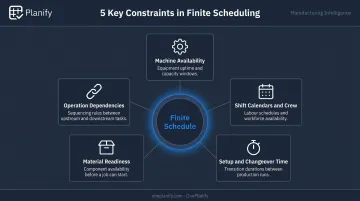
Effective scheduling requires a system that models actual shop floor constraints, including:
- Machine availability and capacity limits
- Shift calendars and crew assignments
- Setup sequences and changeover time
- Material readiness at each operation
- Dependencies between operations within a work order
Key Elements of Shop Floor Scheduling
Resource Allocation
Effective scheduling means matching the right job to the right resource at the right time. That requires accounting for:
- Actual machine availability (not theoretical 100% uptime)
- Labor skill requirements and shift coverage
- Tooling and fixture availability
Any mismatch — wrong machine, unqualified operator, missing tooling — makes the schedule unexecutable before the shift begins.
Job Sequencing and Routing
The order jobs run through a work center directly affects throughput. Sequencing decisions show up immediately in two ways:
- Poor sequencing: excessive changeovers, long setup times, and downstream bottlenecks
- Good sequencing: similar jobs grouped together to minimize transitions, with each work center feeding the next efficiently
Finite vs. Infinite Capacity
This is the most consequential distinction in scheduling:
- Finite scheduling loads jobs against what capacity actually exists — it won't schedule more work than a machine or team can handle in a given shift
- Infinite scheduling ignores capacity limits, stacking jobs into time slots as if resources were unlimited
Cambridge's Institute for Manufacturing describes finite scheduling as treating capacity as a hard constraint that cannot be exceeded. Infinite scheduling, by contrast, is an MRP II-style approach that schedules from due dates and reconciles capacity problems afterward. Infinite scheduling has its place in rough-cut capacity analysis — but it produces schedules that can't be executed as written.
Setup Times and Shift Changes
Two of the biggest sources of lost capacity on the shop floor are routinely undermodeled:
- Setup times between jobs (changeovers, machine prep, tooling swaps)
- Shift handovers (the production gap when one crew hands off to another)
A schedule that treats these as zero loses hours every day to invisible inefficiency.
Operation Dependencies
Within any work order, operations are sequential — step 2 can't start until step 1 is complete. An upstream delay cascades through every downstream operation. Any scheduling system that doesn't model these dependencies will generate a plan that looks feasible on paper but falls apart in execution.
Common Challenges in Shop Floor Scheduling
Variability and Disruptions
No schedule survives contact with reality unchanged. Siemens' 2024 downtime report found that unplanned downtime costs the world's 500 largest industrial companies $1.4 trillion annually — equal to 11% of revenues. Machine breakdowns, worker absences (BLS data shows a 2.9% absence rate in manufacturing), material delays, and quality holds are constant realities.
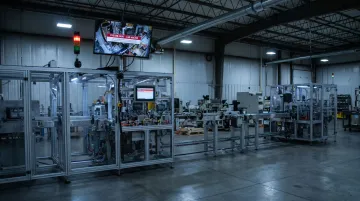
Static schedules have no mechanism to respond. By the time the morning shift starts, yesterday's dispatch list may already be wrong.
The Scheduling-Execution Disconnect
Scheduling software is built to answer one question: "how do we load our capacity?" Shop floor workers need to answer a different one: "what should I work on right now?"
ERP dispatch lists sequence jobs by due date and capacity loading. They don't tell an operator which job to pull next given what's actually happening on the floor at this moment. That gap between the planned schedule and executable floor-level guidance is why so many manufacturers find their ERP scheduling tools underused in practice.
Spreadsheet Dependency
When ERP falls short, manufacturers default to Excel. It's familiar, flexible, and free. But spreadsheet-based scheduling has hard limits:
- No real-time updates — every disruption requires manual recalculation
- Can't model finite capacity or job dependencies accurately
- Version control problems when multiple planners are involved
- Research on spreadsheet error rates consistently finds cell-level error rates of 1–5%, with even moderate-size spreadsheets containing bottom-line errors
Excel is a workaround, not a solution. OnePlanify addresses exactly this gap — delivering spreadsheet-like simplicity while handling setups, shift changes, dependencies, and disruptions without requiring planners to rebuild the schedule from scratch every time something changes.
Data Accuracy Requirements
Finite scheduling is only as good as its inputs. If run times are significantly off, if setup durations aren't captured, or if capacity data doesn't reflect actual shift patterns, the schedule degrades fast. Balancing the need for precise inputs with the dynamic, imperfect reality of a live shop floor is an ongoing challenge most schedulers underestimate.
Shop Floor Scheduling Methods
Finite vs. Infinite Scheduling
| Finite Scheduling | Infinite Scheduling | |
|---|---|---|
| Capacity treatment | Hard constraint | Ignored / reconciled later |
| Schedule accuracy | Executable | Theoretical |
| Best use | Daily shop floor execution | Rough-cut capacity analysis |
For daily shop floor scheduling, finite is the standard. Infinite scheduling has legitimate uses in high-level planning but produces unrealistic floor-level plans.
Forward vs. Backward Scheduling
| How it works | Best for | |
|---|---|---|
| Forward scheduling | Starts from today; fills resource slots as they open | Maximizing throughput, starting work as soon as possible |
| Backward scheduling | Starts from the due date; works back to find required start dates | Identifying when work must begin to hit a delivery commitment |
Most shops use both — backward scheduling to set start-date targets, forward scheduling to assign actual resource slots given what's available.
Dispatching Priority Rules
Forward and backward scheduling determine when work is planned. Dispatching rules determine which job runs first when multiple orders compete for the same machine.
Common options:
- Earliest Due Date (EDD) — simplest and most common; sequences jobs by delivery commitment
- Shortest Processing Time (SPT) — runs the quickest job first; boosts throughput but can leave long jobs waiting
- Critical Ratio — calculated as time remaining until due date divided by remaining processing time; lowest ratio goes first, making it more responsive to actual schedule pressure
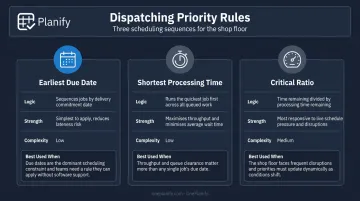
One caveat on EDD: a job with a later due date but many remaining operations can be at higher risk of lateness than one due sooner with a single step left. Due date alone doesn't tell the full story.
Benefits of Effective Shop Floor Scheduling
On-Time Delivery
A well-maintained schedule gives planners forward visibility — they can see which jobs are at risk before they become late shipments. Instead of scrambling to explain a late order, planners can intervene early: shift a job, reassign a machine, or flag a capacity gap before it compounds.
Resource and Machine Utilization
Optimized sequencing reduces idle machine time and unnecessary changeovers. Labor gets deployed where it's needed. Throughput improves without adding headcount or equipment — just better use of what's already there.
Reduced Lead Times and WIP
Work-in-progress sitting on the floor waiting for the next operation is expensive. NIST MEP's documented improvement work shows that targeted scheduling and flow improvements directly reduce lead times and increase throughput. Reducing WIP produces compounding benefits:
- Lower carrying costs and tied-up working capital
- Faster cash conversion as jobs move through quicker
- More predictable delivery windows for customers
- Clearer floor visibility for supervisors and planners
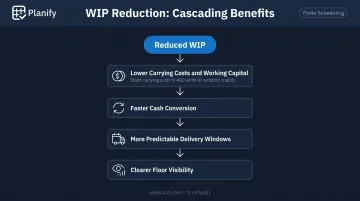
Together, these gains make the case that scheduling isn't just an operational detail — it's a direct lever on financial and customer-facing performance.
How to Choose the Right Shop Floor Scheduling Software
Finite Scheduling Capability
The software must model real constraints — actual machine capacity, setup times, shift calendars, and job dependencies. Generic ERP scheduling modules typically load jobs against theoretical capacity and ignore these variables. Purpose-built finite schedulers are designed from the ground up for shop floor reality.
Gartner's Detailed Manufacturing Scheduling category explicitly defines qualified tools as those producing feasible production schedules that model finite capacity, tools, operational rules, and constraints. That's the baseline requirement.
Ease of Use
The most capable scheduling engine fails if planners can't update it quickly when conditions change. A schedule that takes hours to rebuild after a machine breakdown will be ignored. The tool needs to be fast enough for daily use — and intuitive enough that it doesn't require a specialist to operate.
OnePlanify is built around exactly this: finite scheduling as easy to use as a spreadsheet, built specifically for the messy realities of setups, shift changes, dependencies, and disruptions. Planners should be able to respond to a breakdown in minutes — not hand the problem off to a scheduling analyst.
Real-Time Visibility and Integration
The schedule needs to reflect what's actually happening on the floor — job completions, machine status, material availability. A schedule built on yesterday's data isn't much better than no schedule. Look for software that can consume real-time shop floor status and enable fast re-optimization when disruptions occur.
When evaluating any scheduling tool, these three questions cut through the noise:
- Does it model your actual constraints, or just theoretical capacity?
- Can a planner update and re-run it in under 10 minutes?
- Does it connect to live floor data, or rely on manual inputs?
Frequently Asked Questions
What is shop floor scheduling?
Shop floor scheduling is the process of assigning and sequencing manufacturing jobs across machines and work centers to meet production commitments while making the best use of available resources. At the operational level, it determines who does what, on which machine, and when.
What is the shop floor management process?
Shop floor management is the day-to-day oversight of production activities: scheduling, monitoring work-in-progress, managing labor and equipment, and maintaining quality standards. The goal is to keep actual production aligned with the plan and address deviations quickly.
What are the three phases in shop floor control?
The three phases are order release (issuing work orders to the floor), order dispatching (assigning and sequencing jobs at each work center), and order monitoring (tracking progress and adjusting to keep jobs on schedule). Scheduling drives the first two phases; control covers the third.
What are the 5S in shop floor management?
The 5S methodology (Sort, Set in Order, Shine, Standardize, and Sustain) is a lean workplace organization framework for reducing waste, improving safety, and creating a more efficient working environment. It covers physical organization, not scheduling logic.
What is the difference between finite and infinite scheduling?
Finite scheduling assigns jobs against actual, limited capacity: machines, people, and available time. Infinite scheduling ignores those limits entirely, which means the resulting plan often can't be executed without constant firefighting.
How does shop floor scheduling software improve production efficiency?
Scheduling software automates complex sequencing, models actual capacity constraints, and updates the schedule dynamically when disruptions occur. Planners get real-time visibility into job status and risk, which reduces manual effort, cuts idle machine time, and improves on-time delivery without adding resources.