Introduction
Finite capacity planning is a scheduling and resource allocation approach that builds production plans around the actual, limited capacity of each machine, workstation, and operator — rather than assuming unlimited availability.
For job shop manufacturers, this distinction matters more than it does for almost any other production environment. Custom and mixed-order work means routings vary by job, setup times are significant, and schedules shift daily.
When planning tools ignore real capacity limits, the consequences land directly on the shop floor:
- Missed due dates that erode customer trust
- Chronically overloaded machines with no slack for disruption
- Planners spending their days firefighting instead of planning
A 2025 NIST MEP case study involving Stainless Works — a custom automotive components manufacturer — found that correcting routings, configuring work centers, and scheduling against a confirmed capacity constraint reduced quoted lead time from 12–14 weeks to 5 weeks, with $250,000 in increased or retained sales. The intervention started with getting capacity planning right.
If your shop is quoting lead times based on gut feel rather than actual capacity, the same gap — and the same opportunity — likely exists on your floor.
Key Takeaways
- Finite capacity planning schedules each job against what resources can actually deliver, not theoretical availability.
- Job shops face compounded complexity: variable routings, sequence-dependent setups, and unpredictable job arrivals running simultaneously.
- MRP-style infinite scheduling routinely overloads work centers and generates delivery promises the floor cannot keep.
- Three variables drive outcomes: available capacity per resource, job priority and sequencing rules, and constraint management at bottleneck operations.
- The right tool handles setups, shift patterns, job dependencies, and disruptions without needing a dedicated scheduling expert.
What Is Finite Capacity Planning?
Finite capacity planning acknowledges a simple physical reality: machines, operators, tooling, and floor space have a fixed upper limit of productive hours per shift. Every work order must be scheduled within those limits.
The result is a production schedule where every job is assigned to a resource with confirmed availability within the required window — delivery dates the shop can actually commit to, not estimates that depend on everything going right.
To understand why that matters, it helps to see what finite capacity planning replaces.
How It Differs from Infinite Capacity Planning
Most standard MRP systems use infinite capacity logic. They schedule demand assuming unlimited resource availability, then push the problem of overloads back to the planner as a manual afterthought.
| Approach | How It Works | The Problem |
|---|---|---|
| Infinite capacity | Schedules all demand without resource limits | Overloads appear after scheduling; planner must manually fix them |
| Finite capacity | Builds resource limits into the schedule logic | Overloads surface before commitment; schedule is executable from the start |
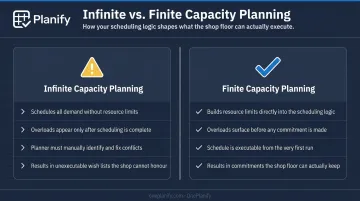
In a job shop where order mix and volume change constantly, the difference between these two approaches is the difference between a plan and a wish list.
Why Job Shop Manufacturers Need Finite Capacity Planning
What Makes Job Shops Structurally Different
Job shops aren't repetitive manufacturers. Each order often follows a unique routing, arrives unpredictably, competes for the same constrained resources, and carries different setup requirements depending on what ran before it. That combination creates scheduling complexity that infinite capacity tools simply aren't designed to handle.
A flow-line manufacturer runs the same product down the same route repeatedly: the schedule is mostly a throughput rate problem. A job shop sequences competing orders across shared resources dynamically, every single day — the planning demands are in a different category entirely.
What Goes Wrong Without Finite Capacity Visibility
Job shops relying on MRP or spreadsheet-based scheduling encounter the same failure modes repeatedly:
- Work center overloads go undetected until the floor is already behind
- Promised due dates are built on assumptions that don't reflect actual queue depth or setup time
- Planners operate reactively, chasing late jobs rather than managing forward
- Floor execution diverges from the plan, because the schedule isn't executable
Research on make-to-order manufacturers has documented average on-time delivery rates as low as 10% at facilities without integrated capacity and material planning — rising to 65% after implementing structured capacity-aware processes.
Why It's Primarily an Operational Issue
Finite capacity planning in job shops isn't driven by regulatory requirements. It's an operational best practice tied directly to revenue and customer trust. Late deliveries erode customer relationships. Expediting burns margin. Reactive firefighting consumes planner time that should be spent on forward planning. The cost of not fixing it compounds quickly.
Finite capacity planning addresses these failure modes by loading each work order against confirmed available hours, respecting setup sequences, and surfacing constraint violations before they reach the floor — so planners are making informed trade-off decisions, not reacting to them after the fact.
How Finite Capacity Planning Works in a Job Shop
The end-to-end logic follows a consistent structure: map real available capacity, load jobs against those constraints in a prioritized sequence, surface conflicts and bottlenecks, then commit the schedule. The inputs that feed this process include:
- Work order list with quantities and due dates
- Routing data per job (operations, work centers, sequence)
- Run times and setup times per operation
- Shift calendars and planned downtime
- Current queue status on the floor
Step 1: Establish Real Available Capacity
This step maps actual productive hours at each work center by accounting for shift schedules, planned maintenance, operator attendance patterns, and time already committed to work in progress. That number is the ceiling against which all scheduling must fit — not a theoretical maximum.
The difference is significant. Oracle's documentation illustrates it clearly: 141.67 processing hours takes 5.6 workdays with 24-hour availability, but 17.7 workdays on a single 8-hour shift. Calendar accuracy changes completion dates dramatically.
Step 2: Sequence and Load Jobs Against Constraints
Jobs are assigned to work centers in a prioritized sequence that respects routing dependencies, setup time relationships, shift boundaries, and operator skill requirements. Sorting by due date alone ignores the ripple effect of setup losses and resource contention.
Effective sequencing means:
- Grouping jobs that share similar setups to minimize changeover time
- Honoring routing order (Op 10 must complete before Op 20 starts)
- Fitting work within confirmed shift windows, not assumed continuous availability
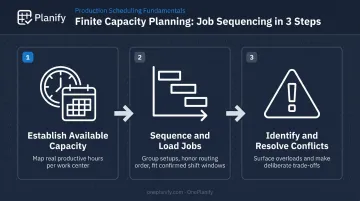
Scheduling software handles this layer by modeling sequence-dependent setups, enforcing routing dependencies, and scheduling only within confirmed shift calendars. OnePlanify's Planify platform pulls work orders and routing data directly from ERPs — including Epicor, SYSPRO, Global Shop, and JobBOSS — so planners work from existing data without manual re-entry.
Step 3: Identify Bottlenecks and Resolve Schedule Conflicts
Once jobs are loaded, the schedule reveals overloads at constrained resources. The planner must then decide how to resolve them. Options include:
- Re-sequencing jobs to reduce setup losses at the constrained resource
- Splitting work orders to allow partial completion earlier
- Reassigning operations to alternate resources where available
- Expediting materials to prevent bottleneck starvation
- Negotiating revised due dates with customers
Finite capacity planning makes these trade-offs visible and deliberate. Without it, the same conflicts exist — they just surface on the floor after it's too late to act.
Key Factors That Affect Finite Capacity Planning in Job Shops
Setup Time and Sequence Dependency
In job shops, changeover time between jobs can vary dramatically based on what ran before. Peer-reviewed research on sequence-dependent setup in job shop environments confirms that setup-time standardization alone doesn't improve shop performance without suitable scheduling procedures — effective rules must use both setup-time and due-date information together.
OnePlanify models this directly: the transition from Job A to Job B may require 45 minutes of re-tooling, while Job A to Job C requires only 15. Ignoring that distinction produces a schedule that appears 85% utilized on paper but runs at 60% in reality — a gap that accumulates across every shift.
Job Priority Rules and Their Downstream Effects
The rule used to prioritize competing jobs at a shared resource — earliest due date, critical ratio, shortest processing time, customer tier — directly determines which jobs ship on time and which don't. There is no universally correct rule. Job shops must define priority logic that matches their business commitments and apply it consistently.
Sorting purely by due date ignores setup costs and creates unnecessary changeover losses. The most effective schedules balance due-date compliance with sequencing efficiency — treating these as competing priorities rather than separate concerns.
Bottleneck Resource Management
Most job shops have one or two constrained resources that limit the throughput of the entire shop. Finite capacity planning must treat these bottlenecks differently from other work centers:
- Schedule bottlenecks first — let them set the pace
- Protect their utilization — avoid starvation from upstream delays
- Feed them with appropriate buffer — absorb variability before it reaches the constraint
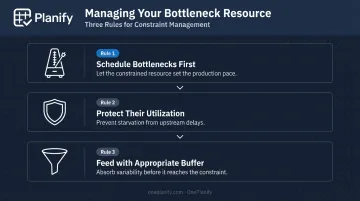
A 2017 simulation study found that Drum-Buffer-Rope scheduling outperforms other approaches when a strong bottleneck exists, while workload control methods perform better when bottleneck severity is low or moderate. The right approach depends on your specific constraint profile.
Data Accuracy as a Precondition
Finite capacity planning is only as reliable as the underlying data. The Stainless Works case required routing corrections and work-center configuration before capacity scheduling produced useful lead-time estimates. Common data problems that undermine scheduling outcomes include:
- Inaccurate routing sequences or missing operations
- Outdated run time standards that don't reflect current tooling or methods
- Shift calendars that haven't been updated for overtime or seasonal schedules
- Queue status on the floor that lags behind actual work in progress
OnePlanify requires five core data inputs before the scheduling engine can produce a reliable plan:
- Active work orders with due dates
- Full operation routings per SKU
- Defined work centers with capacity parameters
- Time standards (setup, run, teardown, move) per operation
- Per-work-center shift calendars
The onboarding process connects and validates this data set during a structured sprint, not a months-long implementation.
Common Issues and Misconceptions
Several assumptions consistently undermine finite capacity planning in job shops. Understanding where these break down is the first step toward building a schedule that holds.
100% utilization is not the target. A schedule loaded to theoretical maximum leaves no room for setup variability, machine downtime, or rework. Effective finite capacity planning builds in realistic efficiency factors and protective capacity — particularly at non-bottleneck resources.
Due date alone is a poor sequencing criterion. Many job shops configure scheduling logic to sort purely by customer due date. This ignores setup time costs and generates unnecessary changeover losses across shifts. The best schedules balance due date compliance with sequencing efficiency.
Owning scheduling software isn't the same as doing finite capacity planning. Oracle, Microsoft, and SAP all expose finite and infinite scheduling as selectable modes. But finite constraints must be actively configured, resource calendars maintained, and setup and run time data kept current. Many systems default to infinite capacity mode — planners need to verify that finite logic is actually engaged.
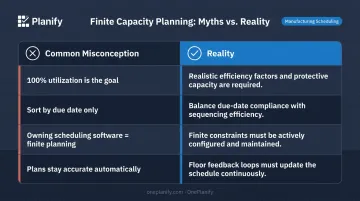
Plans degrade fast without feedback loops. Finite capacity plans become inaccurate quickly when actual floor events — machine breakdowns, absent operators, material delays, rush orders — aren't fed back into the scheduling system promptly. OnePlanify addresses this with full-board replanning in seconds and a "Pretend mode" that lets planners model disruption scenarios and preview order slippage before committing any changes.
When Finite Capacity Planning May Not Be Appropriate
Finite scheduling adds overhead. For very small job shops with only one or two work centers and low order volume, a visual board or simple spreadsheet may be sufficient. The effort of maintaining detailed routing, setup, and shift data may outweigh the scheduling accuracy gained when the operation is simple enough to manage manually.
More importantly, some shops aren't ready for finite scheduling yet — and implementing it too early can do more harm than good. A shop running on poor data doesn't gain precision from a scheduling engine; it gains a false sense of precision that erodes planner trust faster than almost any other failure mode.
Signs your shop needs data foundation work before adopting finite scheduling:
- Routing data is incomplete, outdated, or rarely validated against actual run times
- No defined shift structure exists, or it changes too informally to capture
- Shop floor reporting is ad hoc — operators don't log job progress consistently
- Work center definitions are unclear or overlap in ways planners can't reconcile
The Stainless Works case illustrates this directly: routing corrections and work-center configuration came before forward scheduling was introduced. Getting that foundation right first is what made the scheduling output trustworthy enough for planners to act on.
Conclusion
Finite capacity planning replaces guesswork and reactive firefighting with schedules grounded in what the shop can actually produce. For job shop manufacturers, that translates to delivery commitments that hold, floors that operate from a plan rather than chasing one, and planners who spend their time making forward decisions instead of explaining why jobs are late.
But a finite capacity plan only holds when the inputs and process behind it are solid. The preconditions include:
- Accurate routing and time standard data that reflects how work actually moves through the floor
- Well-defined priority rules so the schedule reflects real business decisions, not software defaults
- Disciplined bottleneck management to prevent one constrained resource from unraveling the rest
- A scheduling tool built for shop floor reality — setups, shift changes, operation dependencies, and unplanned disruptions
When those pieces are in place, planners trust the schedule. And when planners trust it, the floor can execute it.
Frequently Asked Questions
What does "finite capacity" mean?
Finite capacity refers to the real, bounded productive output of a resource within a given time period. Finite capacity planning uses these actual limits to build schedules — rather than assuming resources can absorb unlimited work.
What is an example of finite capacity scheduling?
A machining center running one eight-hour shift can produce a fixed number of parts per day. Finite capacity scheduling loads that machine only up to its confirmed available hours, automatically pushing any overflow to the next available slot rather than stacking jobs that cannot physically fit within the shift.
What are the three types of capacity planning?
The three primary types are resource/workforce capacity planning (people and skills), production/equipment capacity planning (machines and work centers — where finite scheduling applies most directly), and tool/material capacity planning (tooling and inputs). Machine and work-center availability define the scheduling ceiling in production capacity planning.
What is the difference between finite and infinite capacity planning?
Infinite capacity planning schedules all demand assuming unlimited resources, leaving planners to manually fix overloads afterward. Finite capacity planning builds constraints directly into the schedule logic, so the output is executable from the start — overloads surface before commitment, not after jobs slip.
What makes job shop scheduling more complex than standard production planning?
Job shops process highly variable orders with different routings, setup requirements, and due dates at the same time. Unlike repetitive manufacturing — where the same product runs the same route — job shops must sequence competing jobs across shared resources dynamically, and no two days look alike.
How do setup times affect finite capacity planning in a job shop?
Setup times consume real capacity and vary significantly based on job sequence. When setup times aren't modeled in the scheduling logic, the plan overestimates available production time — leading to missed due dates even when individual job run times appear to fit within the shift.