Introduction
Excel remains one of the most widely used tools for production planning in manufacturing. It's familiar, already installed, and for straightforward operations, it genuinely gets the job done.
But as shop floors grow more complex — more work centers, more shifts, more jobs with dependencies — the question shifts from whether Excel is useful to whether it's sufficient.
The scheduling tool a manufacturer uses directly affects on-time delivery, machine utilization, and how quickly the team can respond when a machine goes down or a rush order arrives. Getting this choice wrong has real operational costs.
A planner spending two days manually rebuilding a schedule after a machine breakdown signals a tool problem, not a planning one. That cost compounds every time conditions change.
This article breaks down where Excel holds up, where it breaks down, and how to assess which side of that line your operation sits on — based on job complexity, disruption frequency, and how much schedule volatility your team can absorb.
Key Takeaways
- Excel works for simple operations with low order volumes, limited work centers, and infrequent disruptions
- Dedicated scheduling software enforces real constraints — machine capacity, shifts, setups, job dependencies — automatically
- The right choice depends on how often disruptions hit and how much planner time goes to manual firefighting
- You've outgrown Excel when schedules go stale before updates land and conflicts surface on the shop floor instead of in planning
- OnePlanify brings finite scheduling to SMB manufacturers — as easy to use as a spreadsheet, built for real shop floor complexity
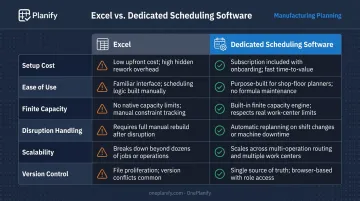
Excel vs Dedicated Scheduling: Quick Comparison
| Factor | Excel | Dedicated Scheduling Software |
|---|---|---|
| Setup Cost | Near-zero; already installed | SaaS subscriptions have reduced upfront cost significantly vs. legacy ERP |
| Ease of Use | Familiar to most planners; no onboarding needed | Modern tools have improved usability; some configuration required |
| Finite Capacity | Cannot enforce constraints natively; overloads caught manually | Core function — schedules within real machine, labor, and shift limits |
| Disruption Handling | Manual re-entry and rescheduling required | Flags conflicts automatically; supports rapid rescheduling across dependent jobs |
| Scalability | Works for simple, low-volume operations | Designed for multiple work centers, shifts, and job dependencies |
| Version Control | Version conflicts common with multiple users | Single source of truth across planning, shop floor, and management |
Production Planning with Excel: What It Is and When It Works
Excel-based production planning means using spreadsheets to organize work orders, map timelines, assign machines and labor, and track job status. For many small manufacturers, it's the first real step toward structured planning — and that's not a knock against it.
Why Excel Stays Dominant
The genuine strengths are hard to argue with:
- Already installed in most manufacturing environments — no additional cost
- Any planner with basic spreadsheet skills can build a working schedule the same day
- Adapts to any workflow without vendor support or IT involvement
- A basic schedule can be up and running within hours, not weeks
For a small operation managed by one or two planners who can walk the floor and see everything firsthand, Excel often does exactly what's needed.
Where Excel Falls Apart
The limitations are equally real:
- Two jobs can compete for the same machine simultaneously — Excel won't catch the conflict. Capacity overloads fall entirely on the planner to spot.
- Without a native shift calendar, schedules can land work on weekends, holidays, or non-existent shifts, requiring constant manual correction.
- Multi-operation routings (Op 10 → Op 20 → Op 30) must be tracked by hand. When one job shifts, every downstream operation needs manual adjustment.
- When a machine goes down, the planner rebuilds from scratch — and constraints like setup times and routing sequences frequently get dropped in the process.
A 2023 trade article in The Fabricator describes how manual Excel-based scheduling creates information-flow breaks that leave schedules disconnected from changing shop floor conditions — a structural limitation of spreadsheet-based planning.
Version control adds another layer of risk. When multiple people update the same file, overwritten changes and contradictory versions are a persistent reality, not an occasional inconvenience.
These problems tend to stay manageable until volume, complexity, or disruption frequency crosses a threshold — which is exactly when the question of dedicated scheduling software becomes worth asking.

Where Excel Works Well
Excel handles production planning adequately when:
- The operation runs a single site with a limited number of SKUs
- Products follow simple, consistent routing sequences
- Disruptions are infrequent — machine breakdowns and rush orders are exceptions, not weekly events
- One or two planners have full visibility of the floor without needing a system to synthesize it
Custom fabricators, small food manufacturers, furniture workshops, and seasonal producers with predictable demand often fit this profile. For these operations, the cost and complexity of dedicated scheduling software may not be justified.
What Is Dedicated Production Scheduling Software?
Dedicated production scheduling software is purpose-built to model the actual constraints of a shop floor — machine capacities, labor availability, setup times, shift schedules, and job dependencies — and automatically produce a feasible, conflict-free schedule.
Gartner's category definition describes these tools as planning production at a detailed level, determining the specific activities, sequences, links, resources, utilities, materials, and time required to manufacture work orders — with finite resources, tools, dependencies, and material flows all part of the model.
Finite vs. Infinite Scheduling: The Core Distinction
The critical difference between dedicated scheduling software and what ERP modules typically provide is the capacity model. Cambridge's Institute for Manufacturing defines finite capacity scheduling as scheduling that "takes capacity into account from the very outset" — based on what's actually available, not on idealized assumptions.
ERP scheduling modules typically assume infinite capacity: they calculate when a job should be done without checking whether the machines, labor, or shift windows to do it are actually available. The result is a plan that looks valid on screen but fails on the shop floor.
OnePlanify's Planify platform illustrates how this plays out in practice. Their documentation notes that schedules built without modeling setup and changeover times often show 85% utilization on paper but deliver only 60% utilization in reality — because re-tooling time isn't being counted as real capacity consumption.
What Dedicated Tools Handle That Excel Can't
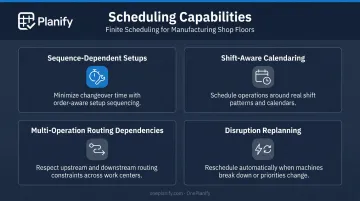
Purpose-built scheduling software addresses four scenarios that Excel simply cannot model without error-prone manual workarounds:
- Sequence-dependent setups — the system knows that switching from Job A to Job B takes 45 minutes while switching from Job A to Job C takes 15, and sequences jobs accordingly
- Shift-aware calendaring — work is placed inside real shift windows, with holidays, overtime rules, and skeleton-crew schedules enforced automatically
- Multi-operation routing dependencies — no downstream operation starts before its upstream prerequisite completes, even after a full disruption replan
- Disruption replanning — when a machine goes down or a rush order arrives, the entire board resequences in seconds, with all constraints preserved
How OnePlanify Bridges the Usability Gap
Dedicated scheduling software has long carried a reputation for complex implementation and months of configuration. SaaS delivery has changed that calculus.
OnePlanify's Planify platform delivers comprehensive finite scheduling — setups, shift calendars, routing dependencies, and disruption replanning — through a browser-based workspace that feels familiar to anyone who's run a spreadsheet. Onboarding is included in the subscription and delivered in small batches, with manufacturers typically running their first real finite schedule within weeks, not months.
The platform also integrates with major ERP systems used by SMB manufacturers — Epicor, SYSPRO, IQMS/DELMIAWorks, Global Shop, JobBOSS, Infor, Odoo, NetSuite, and SAP Business One — pulling work orders and routings from the ERP and dispatching sequenced operations back to the floor. The ERP remains the system of record; Planify adds the scheduling intelligence the ERP module can't provide.
Where Dedicated Scheduling Delivers the Most Value
Understanding what dedicated scheduling does is one thing — knowing where it pays off most is another. The environments where the gap is widest include:
- Multiple work centers running in parallel with competing capacity
- Jobs with sequential process dependencies (mill → weld → finish)
- Operations with frequent setups or changeovers
- Multi-shift facilities where workforce availability varies by shift
- Shops where rush orders regularly disrupt the planned sequence
Job shops, make-to-order manufacturers, mixed-model assembly operations, and any facility where daily disruptions are the norm — rather than the exception — are the environments where the gap between Excel and dedicated scheduling is most visible on the shop floor.
Real-World Example: When the Schedule Breaks Down
Consider a mid-size job shop running four work centers — mill, weld, paint, and assembly — with 15 to 20 active work orders at any given time. The planner maintains a shared Excel file, updated manually as jobs progress. For years, this works adequately.
Then a CNC mill goes down mid-week.
Twelve active jobs depend on that work center. Some are mid-routing — already milled, waiting for welding, but unable to proceed until the mill backlog clears. Others are upstream, waiting to enter the queue.
Rescheduling manually means the planner must:
- Trace every job dependency across the disrupted work center
- Recalculate lead times across all four work centers
- Adjust sequencing to minimize setup changes
- Verify every revised date against shift availability
That process takes two full days. Three customer orders miss their delivery dates before the revised schedule reaches the floor.
ABB's 2023 survey of 3,215 industrial maintenance decision-makers found that more than two-thirds experienced an unplanned outage at least monthly. For a shop relying on Excel, each of those events is a manual replanning event — and each one carries the same risk of dropped constraints and missed deliveries.
With dedicated scheduling software, the planner triggers a full-board resequence in seconds. OnePlanify's "Pretend mode," for example, lets the planner model three different responses to the breakdown — seeing which orders slip and by how much — before committing any changes to the live schedule. The planner picks the least-damaging option and commits. What took two days in Excel takes under an hour.
The hidden cost of Excel in disruption-heavy environments isn't the software itself. It's the planner hours consumed by manual rescheduling and the customer relationships damaged by avoidable delays.
Which Is Right for Your Operation?
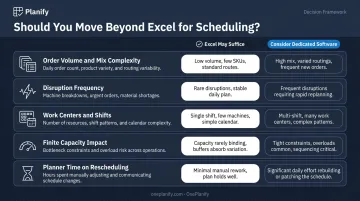
Use these five factors to diagnose where your operation stands:
- Order volume and product mix complexity — how many active jobs, how many unique routings?
- Disruption frequency — are machine breakdowns and rush orders weekly events or rare exceptions?
- Number of work centers and shifts — does your floor run multiple shifts with different availability patterns?
- Whether finite capacity constraints are causing real delivery problems — are schedule conflicts discovered in planning or on the shop floor?
- Planner time on manual rescheduling — is the planner spending more time maintaining the schedule than using it to make decisions?
Once you've assessed those factors, the path forward is usually clear.
Choose Excel If:
- Your operation is small with limited work centers and a handful of active jobs
- Products follow simple, consistent routing sequences with minimal setups
- Disruptions are infrequent and the planner has full floor visibility without a system
- Planning is managed by one or two people who can reconcile discrepancies by walking the floor
Choose Dedicated Scheduling Software If:
- You run multiple work centers or shifts with real capacity constraints
- Jobs have dependencies and setup times that affect sequencing
- Schedule disruptions regularly trigger hours of manual rescheduling
- Late deliveries or capacity conflicts trace back to scheduling failures, not demand or capacity shortages
The crossover point is specific: when a planner spends more time keeping the schedule current than acting on it, the tool is creating work rather than reducing it.
Frequently Asked Questions
What are the 5 steps of production planning?
The standard sequence is demand forecasting, resource planning (materials and capacity), scheduling and sequencing, execution monitoring, and control and adjustment. These steps apply whether the tool is Excel or dedicated software — the difference is how accurately each step can be executed.
What is the difference between production planning and production scheduling?
Production planning determines what needs to be made and in what quantity — the strategic "what." Production scheduling defines when, on which machine, in what sequence, and by whom each job will run — the tactical "how and when." Both are necessary; scheduling is where most shop floors lose control.
Can Excel handle finite capacity scheduling?
No. Excel cannot natively enforce capacity constraints — it will not prevent a schedule from over-allocating a machine or work center, and it won't flag the conflict until someone notices it on the floor. Catching and correcting overloads falls entirely on the planner.
What are the signs you've outgrown Excel for production planning?
The clearest warning signs: schedules go stale faster than they can be updated, capacity conflicts and material shortages surface on the shop floor rather than in planning, and the planner spends more time correcting the spreadsheet than using it to make decisions.
When should a manufacturer switch from Excel to dedicated scheduling software?
Switch when complexity — multiple work centers, shift patterns, setup times, job dependencies — means disruptions regularly trigger hours of manual rescheduling, and late deliveries trace back to scheduling failures rather than raw capacity or demand problems.
How does dedicated scheduling software handle machine downtime or rush orders?
Purpose-built scheduling tools automatically cascade the impact of a disruption across all dependent jobs, reprioritize the queue based on due dates and constraints, and propose a revised schedule without requiring the planner to rebuild it from scratch. OnePlanify's "Pretend mode" lets planners preview the impact before committing any changes.