Introduction
Production scheduling is the process of determining what to produce, in what quantity, on which resources, and when — translating demand into executable shop-floor plans.
For schedulers, plant managers, and supervisors, poor scheduling has immediate, measurable consequences:
- Machines sit idle while operators wait for work
- Jobs compete for the same resource without resolution
- Delivery commitments slip
The firefighting that follows consumes the exact time that should be spent planning.
This guide covers what production scheduling is, how it works through five operational stages, which methods apply in which situations, and what variables make it genuinely hard on real shop floors — including the most common mistakes that cause schedules to collapse before Friday.
Key Takeaways
- Production scheduling converts production goals into specific, time-sequenced tasks assigned to people, machines, and materials
- It differs from production planning — planning sets what and how much; scheduling determines when, where, and in what order
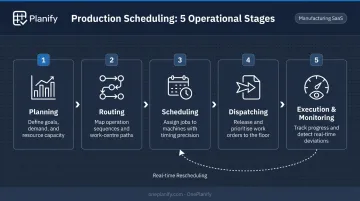
- The five operational stages are planning, routing, scheduling, dispatching, and execution/monitoring
- The four core scheduling methods — finite capacity, infinite capacity, forward scheduling, and backward scheduling — each fit different production environments
- Real-world disruptions — breakdowns, late materials, shift changes — separate a schedule that holds from one that falls apart
What Is Production Scheduling?
Production scheduling assigns manufacturing tasks to specific resources — machines, labor, work centers — within defined timeframes to meet production targets. The operative word is specific: a schedule names the machine, the operator, the start time, and the end time for each operation. That specificity is what makes it executable.
This distinguishes it from a production plan, which tells you what to make and in what volume over the coming weeks or months. A schedule tells every operator, on every machine, in every shift, exactly what to run and when.
The planning vs. scheduling distinction matters practically:
- Production planning sets strategy over weeks or months — what to make, how much, and whether capacity supports it
- Production scheduling is operational and immediate — it sequences specific jobs across specific machines with defined start and end times
Teams that conflate the two often build high-level plans and assume the floor will figure out the rest. The result is a plan that tells people what to make but gives no guidance on how to sequence competing jobs through shared resources — which is where production scheduling begins.
Why Production Scheduling Matters in Manufacturing
The Cost of Operating Without a Structured Schedule
The 2021 MPI Manufacturing Study, which surveyed 408 US and global facilities, reported a median on-time delivery rate of 83% — meaning roughly one in six shipments across the surveyed plants did not arrive on time. That gap has a direct cost in customer trust and repeat business, even when the individual financial penalty per late order is difficult to isolate.
Unplanned downtime compounds the problem. Siemens' 2024 downtime study found that the world's 500 largest industrial companies lose an average of 27 hours of production per month to unplanned equipment failures. Those failures cost enterprises $1.4 trillion annually — equal to 11% of revenue. These are enterprise-scale figures, not SMB benchmarks, but the mechanism is universal: idle machines cost money, and reactive scheduling makes idle time worse, not better.
How Scheduling Connects to Everything Else
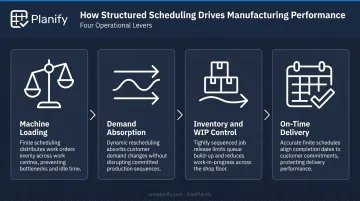
Those costs don't appear in isolation — they're symptoms of a plan that can't absorb reality. Structured scheduling addresses the underlying problem across four operational levers:
- Keeps machines loaded evenly by sequencing jobs so no work center sits idle while another is overloaded, reducing cost per unit
- Absorbs rush orders and supply disruptions without forcing a full rebuild of the plan
- Controls when raw materials are consumed and finished goods released, preventing WIP accumulation and mid-run component shortages
- Drives on-time delivery directly — consistent scheduling builds the reliability that keeps customer relationships intact
How Production Scheduling Works: The 5 Stages
Production scheduling moves from understanding capacity and demand through to live execution on the floor. Each stage feeds into the next. The schedule is not a static document — it must be monitored and adjusted as reality diverges from the plan.
Before any stage begins, the inputs that shape the schedule include:
- Customer orders and demand forecasts
- Current inventory levels and bill of materials
- Machine availability and work center capacities
- Labor shifts and skill constraints
- Known maintenance windows and setup requirements
Planning
The planning stage consolidates demand — open orders plus forecasts — against available capacity in machines, labor, and materials. This is where the master production schedule is built and where resource gaps are first identified. If demand exceeds available capacity in a given timeframe, the planning stage surfaces that conflict before it becomes a floor crisis.
Routing
Routing maps each product's manufacturing path: which operations are required, in which sequence, and on which work centers or machines. A routing for a fabricated part might run Op 10 → Op 20 → Op 30 (mill → weld → finish). Routing determines how long each job will take and what dependencies exist between operations. Every scheduling decision downstream depends on getting this right.
Scheduling
Once routing is defined, actual start and end times are assigned to each operation. Schedulers apply forward or backward scheduling logic, account for finite or infinite capacity, and surface conflicts between jobs competing for the same machine. A schedule that doesn't surface these conflicts before it hits the floor will be resolved — badly — by foremen making improvised decisions in real time.
Dispatching
Dispatching releases work orders to the shop floor: operators receive job instructions, materials are staged, and tooling is prepared. This step converts the schedule into active instructions. The dispatched sequence should reflect the same routing and dependency logic that the schedule enforced — otherwise, foremen will receive work they cannot yet start, and the execution gap opens immediately.
Execution and Monitoring
Once production begins, the schedule must be monitored in real time. Track actual vs. planned progress, flag deviations early — machine breakdown, late material arrival, quality hold — and reschedule remaining work accordingly. This is where most schedules break down. Without a live visibility mechanism, planners are always reacting to yesterday's problems instead of managing today's floor.
Production Scheduling Methods Explained
Finite vs. Infinite Capacity
This is the foundational distinction in scheduling logic:
- Infinite capacity scheduling — schedules jobs without constraining operations by resource availability. Useful for rough-cut planning and determining theoretical throughput, but produces plans that overload work centers without flagging the conflict
- Finite capacity scheduling — respects real-world limits. Machines have only so many hours, operators work defined shifts, and no resource can be double-booked. Finite scheduling produces a schedule the floor can actually execute
For any shop floor where job contention is real and frequent — which describes most job shops and mixed-mode manufacturers — finite scheduling is not optional. Infinite scheduling shows theoretical demand. Finite scheduling shows what the floor can realistically deliver.
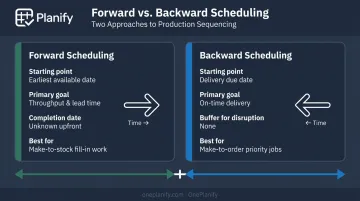
Forward vs. Backward Scheduling
These two methods describe which direction the schedule is built from:
Forward scheduling starts from the earliest possible start date and pushes operations forward until completion. Each operation is scheduled as soon as its predecessor finishes and resources are free. The tradeoff: the final completion date isn't known until the full chain is sequenced, which can produce late deliveries if buffers aren't built in.
Backward scheduling starts from the required delivery date and works back to determine when work must begin. Delivery commitments stay front and center, and WIP holding time is minimized. The risk: it demands accurate lead time data and leaves little room for disruption before the due date slips.
| Forward Scheduling | Backward Scheduling | |
|---|---|---|
| Starts from | Earliest available date | Required delivery date |
| Optimizes for | Throughput and lead time | On-time delivery |
| Main risk | Completion date unknown upfront | No buffer for disruption |
| Best fit | Fill-in and make-to-stock work | Make-to-order priority jobs |
Using Both Methods Together
Many shop floors use backward scheduling for priority make-to-order jobs — where the delivery date is the binding constraint — and forward scheduling for fill-in make-to-stock work, where the goal is utilizing available capacity between higher-priority jobs. OnePlanify supports both scheduling directions, using priority-driven sequencing to differentiate treatment across order types within the same schedule.
The right approach matches scheduling logic to how each order type actually behaves — priority jobs running backward from their due dates, fill-in work pushed forward into available gaps.
Key Factors That Affect Production Scheduling on the Shop Floor
Understanding the methods is straightforward. Keeping a schedule feasible once it hits the floor is where the real difficulty lives.
The Variables That Break Schedules
Setup and changeover times — sequence-dependent setup time shifts based on the preceding job, as confirmed by a 2025 systematic review of 2,141 publications. Treating setup as a flat value shrinks utilization fast. Planify models changeover at the individual job-pairing level (Job A → Job B: 45 min; Job A → Job C: 15 min) and groups compatible jobs to cut re-tooling across the run.
Shift patterns and labor availability — a schedule built on 24/7 machine availability fails the moment staffing only covers two shifts. Planify addresses this with per-work-center shift calendars (1st, 2nd, and 3rd shift), overtime authorization rules, and calendar exceptions for holidays and closures. Jobs that would land on a closed shift are automatically moved to the next valid window — the schedule never places work on a shift that doesn't exist.
Job dependencies and operation sequencing — when Op 20 cannot start until Op 10 is complete, the schedule must enforce that dependency explicitly. Planify applies a predecessor lock — no downstream operation is scheduled until its upstream prerequisite is confirmed — across both single work order routings and cross-work-order parent/child chains.
Machine breakdowns and unplanned downtime — a schedule with no buffer for equipment failure cascades into late orders the moment a machine goes down. Planify replans the entire board in seconds, preserving setup, shift, and dependency constraints. Its "Pretend mode" lets planners model the disruption first — seeing which orders slip and by how much — before any changes go live.
Material availability and supplier variability — a schedule is only as feasible as the materials it assumes are on hand. Late deliveries and incoming quality holds trigger mid-run reschedules, and rescheduling research consistently ranks material delays alongside machine failures as a leading cause of schedule instability.
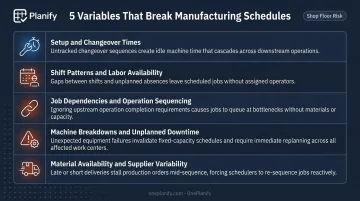
Managing all of these variables simultaneously is what makes shop floor scheduling genuinely hard. Spreadsheets and ERP scheduling modules handle some of these constraints in isolation, if at all. Purpose-built finite scheduling tools are designed to hold them all simultaneously — including through disruptions.
Common Mistakes in Production Scheduling
Treating the Schedule as a Fixed Document
Teams that build a weekly schedule on Monday and don't revisit it until Friday are not scheduling — they are hoping. Real shop floors generate disruptions daily: a machine goes down, a rush order arrives, a component is short. A schedule's value is its ability to be updated when reality diverges from the plan.
Schedule stability — measured by the number of revisions required — is a meaningful operational metric. Constant revisions signal schedule nervousness. Zero revisions on a disrupted floor signal something worse: nobody is actually using the schedule.
The Spreadsheet Ceiling
Spreadsheets are familiar, flexible, and genuinely useful for many tasks — but production scheduling isn't one of them, beyond the basics. The limitations compound quickly on a real shop floor:
| Spreadsheet Limitation | Practical Impact |
|---|---|
| Assumes infinite capacity | Overloads work centers without surfacing the conflict |
| Ignores setup and changeover time | Schedule appears 85% utilized; floor runs at 60% |
| Cannot enforce routing dependencies | Op 20 gets scheduled before Op 10 is done |
| Manual replanning drops constraints | Rebuilding after a breakdown takes hours and misses dependencies |
| No shift calendar awareness | Work lands on shifts that don't exist |
Planify by OnePlanify was built to close exactly this gap — finite scheduling logic in an interface planners can operate from day one, without a multi-month IT project.
Confusing Planning with Scheduling
A master production schedule tells you what to make. A detailed production schedule tells every operator, on every machine, in every shift, exactly what to run and when. Teams that conflate the two build high-level plans and assume the floor will figure out the sequencing. The floor does figure it out — inconsistently, under pressure, and without visibility into downstream impact.
Frequently Asked Questions
What is the difference between production planning and production scheduling?
Production planning determines what to make, in what quantities, and over what timeframe — it is medium-to-long term and strategic. Production scheduling translates that plan into specific, time-sequenced tasks assigned to machines, labor, and work centers. Planning sets direction; scheduling sets the daily execution sequence.
What are the main methods of production scheduling?
The four core methods span two dimensions. Finite scheduling respects real resource constraints; infinite scheduling ignores them (useful for rough-cut planning). Forward scheduling builds from the earliest start date; backward scheduling works from the due date to determine when work must begin. These dimensions are independent — any combination is possible.
What is finite scheduling and why does it matter on the shop floor?
Finite scheduling only assigns work to resources that are available — it respects machine hours, labor shifts, and competing jobs. The result is a schedule the floor can actually execute, rather than one that looks complete on paper but overloads work centers and misses shift boundaries. Where job contention is real, finite scheduling produces commitments you can actually keep.
How often should a production schedule be updated?
It depends on shop floor variability. High-mix, high-disruption environments — job shops, custom machining operations — may require daily or shift-by-shift reschedules. More stable batch operations may update weekly. The key principle: a schedule should be updated whenever actual conditions deviate meaningfully from the plan. Leaving a stale schedule in place after meaningful disruption just moves the problem downstream.
What are the biggest signs that a production schedule isn't working?
The clearest warning signs are: frequent missed delivery dates with no clear root cause, chronic machine bottlenecks that repeat week after week without resolution, excessive WIP buildup between work centers, and schedulers spending more time firefighting and expediting than actually planning. When expediting becomes the default, that's a signal to examine the scheduling process itself — not just the individual jobs.