ERP systems are essential — they connect customer orders to materials, procurement, finance, and inventory in a single system. But their built-in planning modules operate on a fundamental flaw: they assume infinite capacity. According to SAP, basic MRP assumes enough capacity is always available and may leave planners to resolve resource conflicts manually — outside the planning system entirely.
That gap between what ERP generates and what the floor can actually run is where throughput disappears, deadlines slip, and planners spend their mornings fixing last night's schedule instead of running it.
This article breaks down exactly how ERP production planning and finite scheduling differ, where each belongs, and how manufacturers with complex shop floors use them together.
Key Takeaways
- ERP production planning uses infinite capacity logic — it tells you what to build, not when based on real shop constraints
- Finite scheduling sequences jobs against actual machine availability, shifts, setups, and routing dependencies
- ERP schedules often show 85% utilization on paper while the floor runs at 60% — setup times are the hidden gap
- High-mix, make-to-order, and job shop manufacturers need both tools working together
- If planners are manually fixing ERP schedules every morning, that's the signal to add finite scheduling
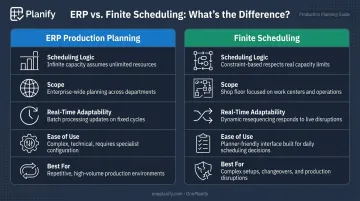
ERP Production Planning vs. Finite Scheduling: Quick Comparison
| Category | ERP Production Planning | Finite Scheduling |
|---|---|---|
| Scheduling Logic | Infinite capacity — assumes unlimited resources, schedules by lead times | Constraint-based — sequences against actual machines, operators, and shifts |
| Scope | Enterprise-wide: inventory, procurement, finance, orders | Shop floor: sequence, timing, and allocation across work centers |
| Real-Time Adaptability | Batch-processed; disruptions require re-running MRP | Built for disruptions — machine breakdowns and rush orders resequenced dynamically |
| Ease of Use | Powerful but complex; modifications often require technical knowledge | Purpose-built for planners; minimal training required |
| Best For | Integrated business operations and high-level capacity visibility | Complex setups, sequence-dependent changeovers, shift constraints, frequent disruptions |
What Is Production Planning in ERP?
ERP production planning determines what to produce, in what quantity, and when — typically through Material Requirements Planning (MRP) or Master Production Scheduling (MPS) logic.
MPS establishes the build plan for sellable products. MRP then explodes the bill of materials to calculate what components and raw materials are needed, in what quantities, and when they must arrive.
The core mechanism is straightforward: ERP takes demand signals, applies standard lead times, and generates work orders and material requirements automatically. It connects production to procurement, inventory, and finance in one system — which is valuable.
Where ERP Planning Works Well
ERP production planning delivers real operational value in:
- High-volume, repetitive manufacturing with predictable lead times and stable BOMs
- Process manufacturing running standard production runs with few competing constraints
- Environments where demand is consistent and work centers rarely compete for the same resource simultaneously
In these settings, the infinite capacity assumption is close enough to reality that ERP-generated plans are workable with minimal manual adjustment.
The Core Limitation
The problem surfaces in complex environments. ERP scheduling doesn't know that a changeover takes 4 hours on your paint line, that your most skilled CNC operator only works first shift, or that Machine 7 is down for preventive maintenance on Thursday. It schedules through all of that, producing a plan that is theoretically correct and practically unworkable.
Many small and mid-size manufacturers compensate with spreadsheets and manual tracking — homemade systems whose full logic may be understood by only one or two people on the planning team. That fragility has real costs when that person is sick, on vacation, or gone.
What Is Finite Scheduling?
Finite scheduling builds a job sequence based on actual, limited capacity — accounting for machine availability, operator shifts, setup times, sequence-dependent changeovers, job routing dependencies, and real-world disruptions. The output is a schedule that reflects what can actually be executed, not just what needs to be done.
Unlike infinite capacity planning, finite scheduling assigns specific start and end times to each job on each resource. When a conflict exists, the system prioritizes based on rules — due date, setup efficiency, priority flags — rather than assuming the conflict away.
What Finite Scheduling Is Built to Handle
The shop floor realities that break ERP schedules are exactly what finite scheduling is designed for:
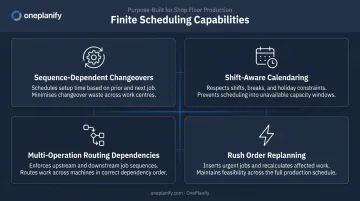
- Sequence-dependent changeovers — a transition from Job A to Job B might take 45 minutes, while Job A to Job C takes 15. Grouping compatible jobs cuts re-tooling time and recovers capacity ERP can't account for
- Shift-aware calendaring — jobs are placed inside real shift windows, including weekend closures, holidays, overtime authorization, and skeleton crew constraints
- Multi-operation routing dependencies — Op 10 cannot overlap with Op 20; Op 30 cannot start until Op 20 is complete, enforced automatically through the entire schedule
- Rush order replanning — when a machine goes down or a customer expedites, the entire board resequences in seconds while preserving all existing constraints
Planify by OnePlanify is built around exactly these constraints. Its "Pretend Mode" lets planners model a breakdown or rush insertion, preview which orders slip and by how much, then commit only when they've chosen the best path forward — replacing reactive firefighting with deliberate, informed decisions.
Where Finite Scheduling Delivers the Most Value
Finite scheduling is worth the most to:
- Job shops and high-mix discrete manufacturers running varied work orders with unique routings
- Make-to-order producers where demand variability makes static lead times unreliable
- Machine shops and press shops where sequence-dependent setup is the primary capacity constraint
- Multi-shift operations where ERP's assumption of 24/7 availability produces unworkable plans
ERP Production Planning vs. Finite Scheduling: Which Is Right for You?
The decision comes down to one honest question: are your planners spending meaningful time every week correcting the ERP-generated schedule before the floor can act on it? If yes, that's the signal.
When ERP Planning Alone Is Sufficient
Manufacturers with high-volume, repetitive production, stable BOMs, predictable lead times, and few competing constraints on individual machines can get adequate results from ERP's built-in planning module. The infinite capacity assumption rarely causes problems when the floor actually runs close to infinite capacity — meaning demand is steady, jobs are similar, and constraints are few.
When Finite Scheduling Is Essential
The ERP schedule becomes unreliable when:
- Changeovers and setups are significant and sequence-dependent
- Rush orders and machine disruptions regularly break the plan
- Multiple operators, shifts, and work centers compete for the same resources
- Jobs follow unique multi-operation routings across departments
- On-time delivery is suffering despite running an ERP
In these environments, a schedule that looks 85% utilized on paper often runs at 60% in reality — because setup times are invisible to the planning engine. Finite scheduling makes the utilization number honest.
The Case for Using Both Together
For most mid-to-large manufacturers, ERP and finite scheduling work best as a layered system, each handling what it does well. Siemens documents this architecture explicitly: ERP handles business strategy, finance, purchasing, and transaction processing; APS handles production planning and scheduling against manufacturing constraints. SAP applies the same logic internally, planning critical products in PP/DS and transferring results to S/4HANA for manufacturing-order execution.
The practical split:
- ERP answers: what needs to be built, how much, and what materials are required
- Finite scheduling answers: when exactly, on which machine, and in what sequence given today's actual constraints
OnePlanify's Planify connects directly to ERP systems — including Epicor, SYSPRO, IQMS/DELMIAWorks, Global Shop, JobBOSS, Infor CloudSuite, NetSuite, Odoo, and SAP Business One. It pulls work orders and routings from the ERP, runs a constraint-aware finite schedule, and dispatches sequenced operations back to the floor. No rip-and-replace required. ERP connector setup is included in the SaaS subscription and delivered during onboarding — not as a separate months-long integration project.
Real-World Impact: When Manufacturers Add Finite Scheduling to Their ERP
The business case for adding finite scheduling to an existing ERP is most visible in documented implementation outcomes.
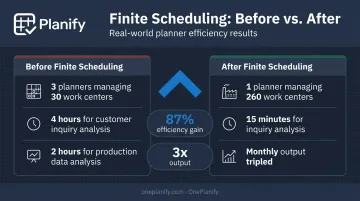
Proform, a manufacturer of complex tubular parts in stainless steel and nickel alloys, passed work orders from their ERP to Opcenter APS after struggling with planning across dozens of work centers. Before the change: three planners managed 30 work centers running 8-hour days. After adding finite scheduling: one planner managed 260 work centers running round the clock — an 87% improvement in administrative efficiency.
Metal Design, a custom metal-components manufacturer handling complex orders with tight deadlines, saw comparable results after implementing Opcenter Scheduling. Customer-inquiry analysis dropped from four hours to 15 minutes, production-data analysis fell from two hours to minutes, and monthly output tripled — without adding equipment or staff.
In both cases, the ERP handled business-level planning. The finite scheduler turned that plan into something the floor could actually execute.
For manufacturers running similar complexity — high-mix discrete, make-to-order, multi-shift with significant setups — the ERP-generated plan is the starting point. Finite scheduling is what makes it executable.
If your planners are spending more time fixing the schedule than running it, OnePlanify is worth a look — finite scheduling built specifically for the setups, shift changes, and disruptions that make shop floor execution hard.
Conclusion
ERP production planning and finite scheduling serve different but complementary roles. ERP is essential for connecting production to the broader business — demand, materials, procurement, and finance in one system. Finite scheduling is essential for turning that plan into something the shop floor can actually execute under real-world constraints.
For manufacturers with complex, constraint-heavy operations, the gap between an ERP-generated schedule and a realistic shop floor plan is where throughput is lost and deadlines are missed. Planners who spend their mornings manually correcting that gap aren't running their shop efficiently — they're compensating for a tool that wasn't designed for their environment.
Closing that gap isn't a luxury. For high-mix, make-to-order, and job shop manufacturers competing on delivery reliability, it's a survival requirement — and the right finite scheduling tool makes it achievable without adding complexity. OnePlanify is built specifically for this: finite scheduling that handles setups, shift changes, dependencies, and disruption, as easy to use as a spreadsheet.
Frequently Asked Questions
What is production planning in ERP?
ERP production planning uses demand signals, BOMs, and lead times to determine what to produce and when — typically through MRP or MPS logic — generating work orders and material requirements automatically. Most ERP systems assume infinite capacity, meaning they don't schedule against real constraints like machine availability, setup times, or shift calendars.
How is SAP used for production planning?
SAP's PP module handles demand management, MRP runs, capacity evaluation, and work order management — connecting production to procurement and inventory. Finite sequencing requires supplemental tools like SAP's PP/DS or third-party schedulers, since core MRP assumes infinite capacity.
What are the 4 pillars of ERP?
ERP component groupings vary by vendor — Oracle lists ten modules, SAP describes a different set. A common teaching framework cites four elements: a centralized database (single source of truth), integrated modules across functions, process automation, and real-time reporting and analytics. Together, these four elements allow a business to run coordinated operations from a single system.
What is the difference between finite and infinite scheduling?
Infinite scheduling (used by most ERP MRP modules) assumes unlimited resources and schedules based on fixed lead times, often producing plans that exceed real capacity. Finite scheduling respects actual constraints — machine availability, operator shifts, setup times — and only assigns work that can physically be completed in the given window.
Can finite scheduling software integrate with an ERP system?
Yes. Most dedicated finite scheduling tools — including OnePlanify — integrate with ERP systems via CSV, API, or direct database connections. Work orders and routings flow in from the ERP; constraint-aware, sequenced schedules flow back out. Manufacturers keep ERP for business-level planning and use the finite scheduler for shop floor execution.
When should a manufacturer use a dedicated finite scheduling tool instead of relying on ERP alone?
Consider a dedicated finite scheduler when planners regularly override or manually adjust ERP-generated schedules, when setups and changeovers significantly impact throughput, when rush orders and disruptions frequently break the plan, or when on-time delivery is suffering despite running an ERP system.