Introduction
Shop floors don't fail because manufacturers lack ambition — they fail because complexity compounds faster than manual processes can handle it. Competing orders, limited machines, shift constraints, and unplanned breakdowns all converge on a single point of failure: the production schedule.
The cost of getting it wrong is significant. Siemens' 2024 downtime report estimates that the world's 500 largest companies lose nearly $1.4 trillion annually to unplanned downtime — roughly 11% of total revenues. The connection between resource availability and schedule feasibility is direct: when capacity planning breaks down, the cost follows.
This guide covers everything you need to build a functional, resilient scheduling system:
- What work centers are and how they're defined
- How production scheduling actually works
- The scheduling methods manufacturers use — and when to use each
- How to manage resources without overloading your floor
- Best practices that separate reactive shops from high-performing ones
Key Takeaways
- Work centers are defined production areas — machines, groups of equipment, or labor areas — each with capacity, cost, and scheduling data attached.
- Work center scheduling sequences operations, assigns resources, and sets timing to hit production targets while minimizing lead time and waste.
- Forward, backward, and finite scheduling serve different needs; finite scheduling is best suited for constraint-heavy shop floors.
- Effective resource management depends on accurate capacity planning, load balancing, and the ability to respond quickly when disruptions hit.
- Finite scheduling software replaces fragile manual workarounds, giving shop floors a repeatable way to handle complexity.
What Is a Work Center?
According to the ASCM Supply Chain Dictionary, a work center is "a specific production area, consisting of one or more people and/or machines with similar capabilities" that can be treated as a single unit for capacity requirements planning and detailed scheduling.
In practice, a work center can be:
- A single CNC machine
- A group of lathes performing identical operations
- An assembly area staffed by multiple operators
- An inspection or testing station
Work centers belong to departments or production lines and serve as the fundamental building blocks of any routing structure.
Internal vs. External Work Centers
Not all work centers sit inside your facility.
Internal work centers are in-house production areas used for routing, capacity planning, cost calculation, and scheduling. Most work center management focuses here.
External work centers represent outside suppliers or subcontractors performing operations you don't perform in-house — heat treating, plating, specialized machining. These connect directly to routing and scheduling logic; the lead time for an outside operation appears in the routing just like an internal one.
Both types feed into three core functions that any scheduling system depends on:
- Scheduling operations across a production routing
- Calculating capacity requirements per time period
- Determining costs for produced items
Inaccurate work center data ripples through every schedule downstream — wrong cycle times, missed capacity limits, and routings that don't reflect reality.
What Is Work Center Scheduling and Why Does It Matter?
Work center scheduling is the process of assigning manufacturing operations to specific work centers, sequencing those tasks, and setting start and finish times to meet production orders within available capacity. Get it right and orders flow predictably. Get it wrong and WIP piles up, lead times drift, and customer commitments start slipping.
What Good Scheduling Optimizes For
A well-built schedule pursues several goals simultaneously:
- Shorter lead times from order release to completion
- On-time delivery against customer due dates
- High machine and labor utilization
- Minimal setup and changeover time between jobs
- Reduced work-in-progress (WIP) inventory sitting between operations
Peer-reviewed research shows that poor lead-time planning assumptions directly increase process variability, driving up WIP levels and extending actual lead times — a compounding problem that starts with flawed scheduling inputs.
The Scheduler's Role
The production scheduler sits at the intersection of job priorities, resource constraints, real-time disruptions, and customer commitments. It's a role that demands constant information flow from every corner of the operation.
The Bureau of Labor Statistics describes production, planning, and expediting clerks as coordinating and expediting the flow of work and materials within or between departments according to the production schedule. That definition undersells it — in practice, schedulers are the ones holding the whole operation together when reality diverges from the plan.
How Scheduling Connects to Production Planning
Work center scheduling is where high-level production plans become executable. It translates outputs from MRP runs or S&OP cycles into time-phased work orders at the shop floor level. Without this translation layer, a valid MRP plan is just an unachievable stack of orders — no clear sequence, no timing, no resource assignment.
Types of Work Center Scheduling
Forward Scheduling
Forward scheduling starts from today's date and sequences operations forward in time to find the earliest possible completion date. It's used when capacity is available and the priority is starting production immediately — useful for available-to-promise calculations or filling idle capacity.
Backward Scheduling
Backward scheduling starts from a customer-required due date and works backward to determine the latest start date. This is the preferred approach when hitting a delivery commitment is the primary constraint, since it minimizes the time jobs spend as WIP waiting in queue.
Finite vs. Infinite Scheduling
Both forward and backward scheduling can run under finite or infinite capacity assumptions — this distinction is often treated as the third key dimension of scheduling type.
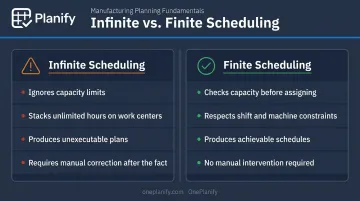
Infinite scheduling calculates work center load without first checking whether capacity is available. It will stack as many hours onto a work center as the order backlog requires, producing plans that look complete on paper but are impossible to execute. Manual intervention is always required after the fact.
Finite scheduling, as defined by the Cambridge Institute for Manufacturing, takes available capacity into account from the outset — scheduling jobs at a work center only when capacity actually exists.
Why Finite Scheduling Is Essential for Real Shop Floors
Infinite scheduling was the standard approach in early MRP II systems, and many manufacturers still live with its limitations. The core problem: it works from a due date, then tries to reconcile the result with real capacity after the fact. On a shop floor with competing orders, sequence-dependent setups, shift constraints, and machine availability windows, that reconciliation becomes a daily fire drill.
Finite scheduling closes the gap between the plan and what the floor can actually execute. Before committing to a schedule, it accounts for:
- Sequence-dependent setups and changeover times
- Shift patterns and operator availability
- Machine capacity windows
- Job dependencies and order priorities
OnePlanify is built around this approach. It's designed for production schedulers who need constraint-aware planning without months of configuration or the steep learning curve that traditional APS systems typically require.
Work Center Resource Management: Key Components
Capacity Planning
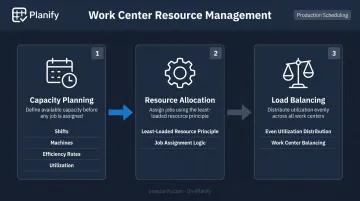
Capacity planning calculates how much productive time a work center actually has available. The inputs include:
- Working calendar (shifts, days, holidays)
- Number of machines or operators
- Efficiency rates (actual vs. theoretical output)
- Utilization factors (time spent on productive work vs. total available time)
Overestimating capacity is one of the most common scheduling mistakes. Deloitte's predictive maintenance research notes that poor maintenance strategies alone can reduce an asset's productive capacity by 5% to 20% — a gap that shows up immediately as schedule overruns when not accounted for.
Resource Allocation and Load Balancing
When multiple machines or operators can perform the same operation, the scheduler must decide which resource gets the job. The least-loaded resource principle — assigning work to the resource with the lowest current workload — prevents bottlenecks from forming at busy machines while idle capacity sits unused nearby.
Load balancing takes this further by redistributing work across all available resources to keep utilization even. Unbalanced loading inflates lead times and hides true capacity. A work center that looks fully booked may have underutilized alternates sitting one step away.
Dynamic Resource Management
Plans break. Machines fail, operators call out, and priority orders land with no warning. Effective resource management requires more than a good initial schedule — it requires:
- A fast process for re-sequencing affected operations
- A clear method for reassigning work to alternate resources
- Immediate visibility into how a disruption affects downstream work centers and due dates
Without a rescheduling mechanism, a static schedule becomes outdated within hours of the shift starting. The plan exists on paper; execution goes a different direction.
Common Work Center Scheduling Challenges
Sequence-Dependent Setups
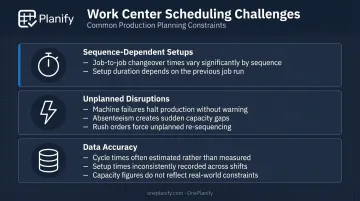
Not all setups take the same amount of time. In painting operations, changing from dark to light colors takes longer than the reverse. In machining, switching between certain materials requires different tooling sequences. When scheduling ignores this, planned setup times are fiction.
A 2022 case study published in the Gazi University Journal of Science found that machine setup times on a turning line were reduced by more than 45% using SMED methodology — illustrating how much time is actually embedded in changeovers when they're measured and optimized. Scheduling that doesn't account for job-to-job sequence variation leaves that time invisible until it shows up as a production delay.
The Disruption Problem
A schedule built Monday morning may be partially invalid by Monday afternoon. Equipment failures, absenteeism, material shortages, and emergency orders all hit simultaneously on real shop floors. The problem isn't that disruptions happen — it's that most scheduling processes have no structured response for when they do.
An effective schedule requires a rapid rescheduling process built alongside it. When disruptions hit, planners need a defined protocol — not an ad-hoc scramble — to reassign work, adjust sequences, and communicate changes to the floor quickly.
Data Accuracy
Every schedule is downstream of its data. If cycle times are wrong, setups are missing, capacity figures are outdated, or shift calendars haven't been maintained, the resulting schedule reflects those errors precisely. No matter how capable the scheduling engine, bad inputs produce bad outputs.
Maintaining accurate data is an ongoing operational discipline. It determines whether your schedule gives planners a reliable basis for decisions — or quietly undermines every commitment made to the floor.
Best Practices for Effective Work Center Scheduling
Strong scheduling comes down to a few disciplines most shops already know but don't consistently execute. Here's where to focus:
- Validate your master data regularly. Cycle times, setup times, capacity figures, efficiency rates, and shift calendars all need to reflect current reality. A schedule is only as reliable as the data it's built from — garbage in, garbage out applies here without exception.
- Use scheduling software built for shop floor constraints. Generic planning tools and spreadsheets can't enforce capacity limits, handle sequence-dependent setups, or respond to disruptions in real time. Purpose-built finite scheduling tools handle this automatically. OnePlanify, for example, combines comprehensive finite scheduling with the ease of use of a spreadsheet — lowering the adoption barrier for shops that have avoided purpose-built tools.
- Build structured feedback loops. Capture actual vs. planned performance from the floor — real cycle times, actual setup durations, unplanned downtime — and feed that data back into the scheduling system. Without this loop, the same inaccuracies repeat indefinitely and schedule adherence never improves.
Frequently Asked Questions
What is work center scheduling and why is it important in production systems?
Work center scheduling is the process of sequencing and timing manufacturing operations across work centers to meet production targets. It directly determines lead times, resource utilization, and delivery performance. Get it wrong and the entire shop floor pays for it.
What are the three types of scheduling?
The three primary types are forward scheduling, backward scheduling, and finite scheduling. Forward scheduling starts from a known date to find the earliest possible finish. Backward scheduling works from a due date to determine the latest acceptable start. Finite scheduling layers in real capacity constraints to produce plans the floor can actually execute.
What is the definition of a work center?
A work center is a designated production area — such as a single machine, a group of identical machines, or an assembly area — where specific manufacturing operations are performed. It serves as the fundamental unit for scheduling, capacity planning, and cost calculation across any production routing.
What is the difference between finite and infinite scheduling in a work center?
Infinite scheduling ignores capacity limits and can overload a work center on paper, producing plans that require manual correction. Finite scheduling respects actual available capacity and produces realistic, achievable schedules. For complex shop floors with competing constraints, finite scheduling is the only approach that generates plans the floor can follow without constant intervention.
How does capacity planning relate to work center scheduling?
Capacity planning determines how much production time a work center actually has available based on shifts, efficiency rates, and working calendars. Work center scheduling uses this data to assign operations without overloading resources or creating plans the floor can't execute.
What are common work center scheduling challenges in manufacturing?
Three challenges come up repeatedly on real shop floors. Sequence-dependent setup times inflate changeover durations when job order isn't optimized. Unplanned disruptions — machine failures, absenteeism, rush orders — invalidate static schedules fast. And inaccurate master data causes the schedule to drift from reality from the moment it's built.