Introduction
Work order scheduling is the process of assigning manufacturing work orders to specific machines, work centers, and operators at defined times based on available capacity and production priorities.
For shop floor managers, this is where the production plan either becomes reality or falls apart. Without structured scheduling, capacity conflicts are invisible until they hit, due dates slip without warning, and supervisors spend their days reprioritizing by feel rather than managing by plan.
This guide covers work order scheduling end-to-end:
- What it is and how it differs from general production planning
- Why it matters specifically on the shop floor
- How the scheduling process works, step by step
- Which factors shape scheduling decisions
- Where most teams go wrong — and how to fix it
Key Takeaways
- Work order scheduling decides which jobs run, on which machines, and who operates them — distinct from planning, which determines what needs to be done
- Effective scheduling matches each work order to real capacity: available machines, qualified operators, and open time windows
- Good scheduling cuts lead times and prevents bottlenecks — poor scheduling causes missed shipments and idle crews
- Most scheduling failures stem from tools that can't model real shop floor constraints — not from lack of effort
- Finite scheduling, not infinite, is the only approach that produces a plan the floor can actually execute
What Is Work Order Scheduling?
Work order scheduling is the act of determining the specific start time, end time, work center, and operator assignment for each work order — turning a backlog of jobs into a structured, time-bound production plan.
The goal is a sequenced, capacity-checked schedule that tells every operator what to work on, in what order, and for how long. Get it right, and the floor runs without supervisors chasing answers all shift.
How Scheduling Differs From Planning and Production Planning
These three terms get conflated all the time, and the confusion causes real problems:
| Function | What It Answers | Who Owns It |
|---|---|---|
| Production planning | How much do we need to produce and when? | Planning/management |
| Work order planning | What scope, materials, and labor does this job require? | Engineering/planning |
| Work order scheduling | When and where does this planned work get executed? | Shop floor scheduler |
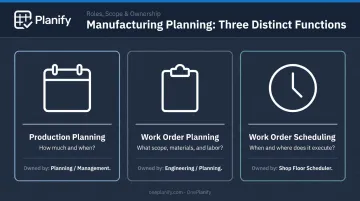
Planning defines the scope of a job. Scheduling decides which machine runs it on Tuesday at 6 AM, which operator is assigned, and what comes before and after it in the queue. Both are necessary. Expecting a production plan to double as a floor schedule is a specific mistake — one that leaves operators guessing, queues backing up, and supervisors firefighting instead of managing.
Why Work Order Scheduling Matters on the Shop Floor
Manufacturing shop floors create scheduling demands that don't exist in most other environments. Several factors stack on top of each other:
- Shared machines with finite capacity — a CNC mill can only run one job at a time, and every scheduling decision affects every job behind it in the queue
- Sequence-dependent setups — switching from Job A to Job B may require a 45-minute changeover, while switching from Job A to Job C takes 15 minutes; order that sequence wrong and you lose capacity you can't recover
- Multi-step dependencies — Op 20 cannot start until Op 10 finishes; ignore that constraint and you get false starts and work-in-process jams
- Shift-based labor availability — operators aren't available 24/7, and a schedule that lands work on a closed shift or skeleton-crew weekend is fiction before it reaches the floor
What Happens Without Structured Scheduling
The pattern is consistent: jobs pile up at bottleneck work centers, operators wait for instructions or self-direct based on habit, and supervisors spend their time expediting rather than managing. APQC's benchmarking data across 4,176 companies shows a median production schedule attainment of 90% — meaning even at the median, 1 in 10 scheduled jobs doesn't complete as planned. Below-median performers see significantly higher miss rates.
The cost consequences are direct:
- Overtime to catch up on delayed jobs
- Expedite fees to move materials faster
- Late delivery penalties that damage customer relationships
Poor scheduling isn't a workflow inconvenience — it has a measurable dollar figure attached to every missed job.
Finite vs. Infinite Scheduling
Most CMMS and ERP systems use infinite scheduling — they assign work orders to time periods regardless of whether the capacity to execute them actually exists. The result is plans that look feasible on paper and fall apart on the floor.
Finite scheduling only commits to jobs the verified capacity can support. It accounts for real shift windows, setup times, operator availability, and machine state before placing a job in the queue. For complex shop floors where these variables interact continuously, infinite scheduling doesn't produce unrealistic plans occasionally — it produces them systematically.
How Work Order Scheduling Works on the Shop Floor
Work order scheduling is a repeating cycle, not a one-time event. It moves from gathering and prioritizing incoming work, to verifying job readiness, to sequencing across work centers, to managing disruptions as they arise.
Step 1: Gather and Prioritize Work Orders
Pull all open, approved work orders into the scheduling window. This includes:
- Production orders released from ERP/MRP
- Maintenance work orders
- Quality-triggered rework jobs
Rank them by due date, customer priority, job criticality, and any safety or regulatory deadlines. A clear prioritization framework here prevents the constant ad-hoc reprioritization that destabilizes everything downstream.
Step 2: Verify Job Readiness
A work order should only enter the active schedule if it's execution-ready:
- Materials confirmed available
- Tooling and fixtures staged
- Required operator skills identified and available
- Permits or safety clearances in place
Scheduling unready work is one of the most reliable ways to collapse a mid-week schedule. A job that hits the floor missing a fixture or waiting on a material pull will stall, and everything queued behind it stalls with it.
Step 3: Sequence and Assign to Work Centers
This is the core scheduling action. For each ready work order:
- Match to a work center based on available capacity and required equipment
- Order the job sequence to minimize changeover time — grouping similar jobs to reduce re-tooling
- Respect upstream/downstream dependencies — no downstream operation starts before its predecessor finishes
- Align with shift start times — jobs don't get placed on shifts that don't exist
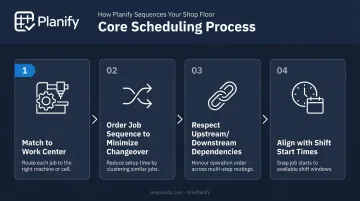
This step is where finite scheduling logic is applied. Only jobs the capacity can actually support get committed to the schedule.
Finite scheduling software like OnePlanify's Planify handles the complexity here: sequence-dependent setups, shift calendars, multi-operation routing, and dependency enforcement. When disruptions occur, the platform replans around existing constraints rather than abandoning them.
Step 4: Publish, Execute, and Respond to Disruptions
Once the schedule is locked and communicated to operators and supervisors, execution begins. Disruptions will occur. The scheduling process must support fast response, not full rebuilds.
Key elements of an effective disruption response:
- Escalation protocol: define what triggers a mid-schedule change versus what waits for the next cycle
- Impact preview before commitment: see which orders slip before approving a change, not after
- Constraint preservation during replanning: setup times, shift windows, and routing dependencies must survive the replan — otherwise the new schedule breaks the same rules as the old one
Key Factors That Affect Work Order Scheduling
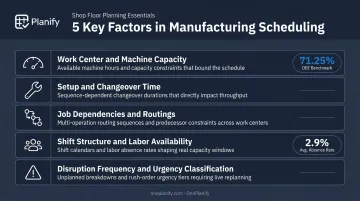
These five factors directly shape every scheduling decision on the floor. Miss one, and your committed timeline stops reflecting reality.
Work center and machine capacity — Available hours, planned downtime, and maintenance lockouts set the hard ceiling for any committed period. According to ASCM's OEE framework, a work center with 93.75% availability, 80% performance, and 95% quality yield delivers only 71.25% of theoretical capacity — that gap is where overloaded schedules originate.
Setup and changeover time — Sequence-dependent setups must be modeled explicitly. If switching from Job A to Job B takes three times longer than Job B to Job C, that asymmetry belongs in the schedule, or completion estimates will drift consistently.
Job dependencies and routings — Each operation in a multi-step work order cannot start until its predecessor completes. Ignoring these dependencies creates false starts and WIP jams at constrained work centers.
Shift structure and labor availability — Schedules must reflect actual shift windows, known absences, cross-training gaps, and overtime authorization. The BLS reports a 2.9% manufacturing absence rate for 2025, meaning full-crew assumptions will be wrong at a predictable rate.
Disruption frequency and urgency classification — How often unplanned events occur — and how they're classified — determines how much buffer belongs in the schedule. Not every rush request is a genuine emergency; a clear escalation protocol keeps priority inflation from eroding schedule integrity.
Common Mistakes Shop Floor Managers Make With Work Order Scheduling
Treating Scheduling as a Weekly Event
Build the schedule on Monday, ignore it until the following Monday, and by Wednesday it's fiction. Operators lose confidence in a schedule that doesn't reflect current reality and start self-directing. Once that happens, supervisors are back to verbal reprioritization and the floor runs on tribal knowledge rather than a plan.
Scheduling is a continuous process. It requires regular updates as jobs complete, disruptions occur, and priorities shift.
Assuming CMMS or ERP Scheduling Is Enough
Most CMMS and ERP tools store work order data well. They were not designed for fast, visual, constraint-aware sequencing across multiple work centers. Schedulers working inside these systems typically default to spreadsheets for the actual sequencing work — and spreadsheets can't model capacity, enforce routing dependencies, respect shift calendars, or replan dynamically under disruption.
OnePlanify fills this gap as a dedicated finite scheduling layer that sits alongside your existing ERP. It pulls released work orders, routings, and shift calendars from the ERP, runs constraint-aware sequencing, and pushes the sequenced schedule back to the floor.
ERP connector setup is included in the subscription and delivered during onboarding — not sold as a separate implementation project.
Scheduling to 100% Theoretical Capacity
Committing every available minute on the schedule produces overloaded plans with no room for setup time, shift transitions, quality checks, or any variability. When machines run at only 71% of theoretical capacity on a good day — accounting for availability, performance, and quality losses — a schedule built to 100% nominal capacity will miss consistently.
Operators learn to distrust the schedule, and supervisors compensate by padding estimates informally. That padding is invisible to planning — creating demand mismatches and generating the same overtime and expediting costs it was supposed to prevent.
Schedule to what the floor can actually produce, using measured capacity data rather than nameplate figures.
Conclusion
Work order scheduling converts a production plan into floor-level commitments that operators can actually execute. It only does that job when it accounts for real constraints: machine capacity, sequence-dependent setups, routing dependencies, shift patterns, and the disruptions that will arrive.
The gap between a theoretical schedule and one the floor trusts comes down to approach and tools. A schedule built on infinite-capacity assumptions, maintained in a spreadsheet, and updated once a week will drift from reality in hours.
That drift is avoidable. A schedule built on finite capacity logic — enforced through real shift calendars and routing dependencies, and replanned quickly when disruptions hit — does the opposite:
- Reduces reactive firefighting as exceptions get handled before they cascade
- Builds predictability that production teams can rely on shift to shift
- Earns the trust of customers through consistent, committed lead times
- Compounds those gains over time as the floor stops running on heroics
The constraints are real. The tools to manage them are available. The choice is which kind of schedule your floor runs on.
Frequently Asked Questions
What is an example of a work order?
A machining work order might specify: machine a batch of 50 aluminum brackets on CNC Mill #3, estimated 4 hours of run time plus 30 minutes of setup, operator requires certification on that machine, due by end of shift Thursday. It defines what to make, where to make it, who can run it, and when it's due.
What is an example of a work schedule?
A shop floor work schedule is a time-blocked plan assigning work orders to specific work centers, shifts, and operators across a given week — with job sequence and start/end times included. For example: CNC Mill #3 runs Job 1042 on first shift Monday, Job 1055 on second shift Monday, and Job 1061 on first shift Tuesday.
What is the difference between a PO and a work order?
A Purchase Order (PO) is a financial document authorizing the purchase of materials or services from an external supplier. A work order is an internal document authorizing and directing a specific job or task to be performed within the facility.
What is the difference between work order planning and work order scheduling?
Planning determines what needs to be done — scope, materials, labor estimates, and required permits. Scheduling determines when and where that planned work gets executed on the floor.
What is finite scheduling in manufacturing?
Finite scheduling assigns work orders only within the actual available capacity of machines, work centers, and labor. Infinite scheduling, by contrast, assigns work regardless of whether the capacity to execute it exists — which produces plans that look feasible on paper but are impossible to run. Finite scheduling is the only approach that generates commitments the floor can actually keep.
How do you prioritize work orders on the shop floor?
The key criteria are customer due date, job criticality, downstream dependencies, safety or compliance urgency, and the cost of delay. A documented prioritization framework prevents the ad-hoc reprioritization that erodes schedule integrity — when every supervisor can escalate any job to "top priority," the priority system stops functioning entirely.