Was the plan wrong? Maybe. But the more likely answer: there was never a real schedule.
This confusion — treating a production plan and a production schedule as the same thing — is one of the most persistent sources of late deliveries, wasted capacity, and shop floor chaos in manufacturing. According to NIST's economics of machinery maintenance study, unplanned downtime and disruption cost U.S. discrete manufacturers an estimated $18.1 billion in losses in 2016 alone — and a significant portion of that stems from plans that were never stress-tested against real capacity constraints.
This article breaks down the difference between a production plan and a production schedule, why the gap between them causes so much operational pain, and what it takes to close it.
Key Takeaways
- A production plan defines what to make and how much — it's a target, not a path
- A production schedule assigns specific jobs to specific machines, shifts, and time slots — it answers when, who, and in what order
- MRP output is a plan, not a schedule — it assumes infinite capacity and ignores setups, shifts, and routing constraints
- When plan and schedule don't align, the result is overloaded work centers, part shortages, and missed due dates
- Finite scheduling tools sequence jobs against real capacity — accounting for setups, shift windows, and routing — so the schedule your team works from is actually achievable
What Is a Production Plan in Manufacturing?
A production plan is the strategic document that determines what a plant must produce over a given horizon — days, weeks, or months — based on customer orders, forecasts, inventory levels, and high-level capacity. Planning is concerned with what and how much, not the precise timing of individual jobs.
The Layers of Planning
Manufacturing planning operates in a hierarchy:
- Master Production Schedule (MPS): Sets production targets by item and time bucket — the anticipated build schedule for specific configurations, quantities, and dates (per APICS Dictionary, 16th Edition)
- Material Requirements Planning (MRP): Uses the MPS, bill of materials, and inventory data to calculate what materials are needed and when — recommending replenishment orders and flagging rescheduling needs
These outputs express intent. Neither translates directly into an executable shop floor sequence.
The MRP-as-Schedule Trap
Because MRP produces detailed output — quantities, dates, item-level detail — it's tempting to treat it as a schedule. Many manufacturers do exactly that, and it's the single most common plan-to-schedule mistake.
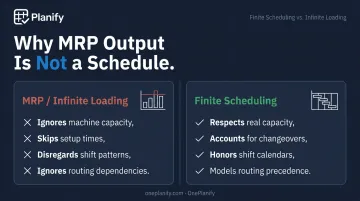
MRP does not account for:
- Finite machine capacity
- Sequence-dependent setup and changeover times
- Shift patterns, holidays, and operator availability
- Inter-operation dependencies
APICS explicitly defines infinite loading as assigning work to a work center beyond its capacity — which is exactly what standard MRP does. When that plan hits the shop floor, the gaps show up fast: overloaded work centers, missed due dates, and sequences that look logical on paper but are impossible to run.
What Is a Production Schedule in Manufacturing?
A production schedule is the time-sequenced, resource-specific assignment of jobs to machines, work centers, and operators. Where a plan says "make 200 units of Part X this week," a schedule says: Job A runs on Machine 2 from 8:00–11:30 AM, then Job B starts after a 45-minute changeover.
Scheduling answers when exactly, on which resource, and in what order.
What a Real Schedule Must Respect
According to a 2025 CIRP review of production scheduling and control, a real finite schedule requires:
- Specific machines, operators, tools, and fixtures
- Machine availability and actual capacity limits
- Setup and changeover times per job pair
- Job priorities, due dates, and inter-operation precedence
Infinite vs. Finite Capacity Scheduling
The distinction matters enormously in practice:
| Scheduling Type | How It Works | The Problem |
|---|---|---|
| Infinite (ERP/MRP) | Assigns work without checking available capacity | Work centers get overloaded; schedule is theoretical |
| Finite | Sequences jobs only when the resource has capacity | Produces an executable, realistic job queue |
APICS defines finite scheduling as scheduling work at a work center only when that work center has capacity. If your system doesn't check capacity before assigning work, you don't have a schedule — you have a plan with clock times attached to it.
Plan vs. Schedule: Key Differences in Manufacturing
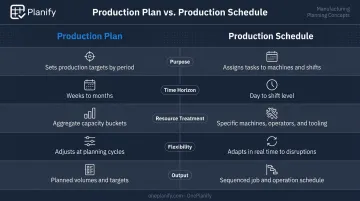
| Dimension | Production Plan | Production Schedule |
|---|---|---|
| Purpose | Defines what to make and how much | Defines when to run it and on which resource |
| Time horizon | Weeks to months | Day to shift level |
| Resource treatment | Aggregate or infinite capacity | Finite, specific machine and operator assignments |
| Flexibility | Refreshed with demand signals | Updated with shop floor events in near real-time |
| Output | List of what's needed | Sequenced job queue by resource |
Timing and Horizon
Plans operate over a medium-term horizon and are typically refreshed in weekly S&OP or planning cycles. Schedules operate at the day-to-shift level and must respond immediately — when a machine goes down, a job runs long, or a rush order lands at 10 AM.
Granularity and Constraints
Plans work at the level of orders and aggregate capacity. Schedules work at the level of individual operations on specific machines. The jump between the two requires incorporating everything the plan glosses over:
- Setup sequences and changeover time
- Overlapping or partial shifts
- Tooling and fixture availability
- Routing dependencies between operations
Who Owns Each
That granularity gap explains why ownership typically splits across two roles. Planning is owned by a production planner or supply chain team working from ERP/MRP. Scheduling is owned by a shop floor scheduler or supervisor. When these roles work from different tools and different data, the gap between plan and reality widens — and the first sign is usually a customer order at risk.
What Goes Wrong When Plan and Schedule Don't Match
Overloaded Work Centers Compound Every Hour They Run Hot
When a plan assigns more work to a resource than it can actually run in a shift, schedulers face a choice: build a dishonest schedule, or watch jobs pile up and compete for the same machine. The same NIST study that quantified downtime losses also found that establishments in the highest quartile of reactive maintenance reliance experienced 3.3 times more downtime than those in the lowest quartile. Reactive planning works the same way — each overloaded shift makes the next one harder to recover from.
One Bottleneck Stalls the Entire Downstream Flow
One overloaded work center doesn't stay isolated. Downstream operations waiting on parts from that bottleneck stall. Materials ordered based on the original planned sequence may now be sitting in the wrong place: creating shortages for jobs that should be running and excess WIP for jobs that aren't ready yet.
Schedulers Shift From Planning to Firefighting
That cascade doesn't resolve itself — it gets managed. Schedulers pull overtime, bump lower-priority work, and expedite by phone call. This burns out planners, erodes consistency, and produces a shop floor that runs on tribal knowledge rather than a trusted schedule.
Customer Commitments Break When Capacity Reality Kicks In
Planners commit to customer due dates based on what the plan suggests is feasible. But once finite capacity, setup times, and shift reality are applied, those dates prove unachievable. The result is missed commitments and damaged customer relationships — the planning layer simply never accounted for how the floor actually runs.
Separate Tools Mean Decisions Run on Stale Data
When ERP sits on one side and spreadsheets on the other, neither planners nor managers have a single source of truth. Changes to the plan don't automatically update the schedule. Floor actuals don't feed back to the plan. Decisions get made on stale data, and corrections arrive too late to matter.
How to Bridge the Plan-Schedule Gap on Your Shop Floor
Build Plan and Schedule Together, Not Sequentially
The traditional approach treats planning and scheduling as sequential handoffs: planning finishes, hands off to scheduling, scheduling builds the queue. Leading manufacturers build them concurrently — so that every planning decision is tested against real capacity, setup constraints, and priorities before it becomes a commitment. When demand changes, the revised schedule is immediately visible on the floor.
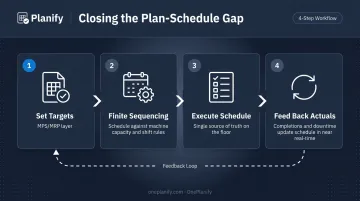
What a Good Workflow Looks Like
- The plan sets production targets and material requirements (MPS/MRP layer)
- The scheduling layer sequences those targets against finite machine capacity, shift calendars, setup rules, and job priorities
- The resulting schedule — not the MRP printout — becomes the single source of truth for the floor
- Floor actuals (completions, delays, downtime) feed back to update the schedule in near real-time
The Role of Finite Scheduling Tools
Finite scheduling software takes plan inputs and automatically sequences jobs while respecting real constraints: capacity limits, changeover sequences, shift changes, and routing dependencies.
OnePlanify's Planify sits between the ERP and the shop floor as a dedicated finite scheduling layer — pulling work orders, routings, and work-center data from systems like Epicor, SYSPRO, Global Shop, JobBOSS, SAP Business One, and others, then producing a constraint-aware, executable schedule the floor can actually run.
Planify handles the complexity most scheduling tools sidestep:
- Models sequence-dependent setup times across jobs
- Enforces routing dependencies across operations
- Respects shift calendars, including holidays and overtime rules
- Replans the entire board in seconds when disruptions hit
- Includes a "Pretend mode" so planners can preview which orders will slip before committing to any change
The result is comprehensive finite scheduling that's as easy to use as a spreadsheet — no six-month APS implementation required.
Practical Starting Steps
For shops still working from disconnected plans and spreadsheet schedules:
- Audit where your plan ends and your schedule begins — Are MRP outputs being run directly on the floor without a true scheduling layer?
- Identify your top 2–3 constraint resources and start scheduling those finitely first, rather than trying to model the entire plant at once
- Establish a feedback loop so floor actuals — job completions, delays, machine downtime — flow back to update the schedule in near real-time rather than waiting for the next planning cycle
Frequently Asked Questions
What is the difference between a plan and a schedule?
A plan defines what needs to be done and what resources are required at an aggregate level. A schedule specifies exactly when each task will run, on which machine or work center, and in what sequence. Scheduling is more granular and time-specific, and it must account for finite capacity, setup times, and shift availability.
What is the difference between planning and a plan?
Planning is the ongoing process of analyzing demand, capacity, and resources to decide what should be produced. A plan is the specific output of that process: a set of production targets or material requirements for a given period.
What is the difference between a plan and a routine?
A plan is a deliberate, goal-driven document for achieving a specific outcome, such as producing 500 units by Friday. A routine is a habitual, recurring set of actions performed regularly without needing to be re-decided each time, like daily machine startup checks.
Can a manufacturer have a plan without a schedule?
Yes, and many do. Shops running MRP output as their shop floor document often have a plan but no true finite schedule. The MRP doesn't reflect real capacity limits, setup times, or shift availability, so overloading and missed dates are the predictable result.
What happens when a production plan and shop floor schedule don't align?
Work centers get overloaded, downstream jobs stall waiting on parts, schedulers resort to manual expediting, and customer due dates get missed. The root cause is the same in almost every case: the plan was built on assumptions the shop floor can't honor.
What is finite scheduling and how does it differ from basic production scheduling?
Finite scheduling builds a job sequence that respects the actual, limited capacity of each machine and work center: jobs are only placed when the resource can actually handle them. Basic infinite scheduling (typical in MRP) assigns work without checking whether the resource can handle the load within the available time, producing schedules that appear feasible but break down on the floor.