Introduction
Manufacturing shop floors run on borrowed time. Machines, operators, setups, shift changes, and rush orders all compete for the same finite capacity — simultaneously, every day. One machine breakdown or surprise expedite can unravel a week's worth of careful planning.
Static spreadsheets and standard ERP scheduling modules weren't built for this. They fix a plan at the start of the day and require manual intervention every time reality diverges from the plan — and on most shop floors, that's constant. The result: missed due dates, idle machines, and overtime that could have been avoided.
The scale of this pressure is real. According to Deloitte's 2025 smart manufacturing survey, 35% of large US manufacturer executives rank advanced production scheduling as a top-two investment priority for the next two years.
Compounding that: 46% report moderate-to-significant difficulty filling planning and scheduling roles. More scheduling complexity, fewer experienced planners to manage it — that's the gap dynamic scheduling software is increasingly being asked to close.
This article covers the five best dynamic scheduling tools for shop floor planning, from purpose-built finite schedulers to enterprise APS platforms.
Key Takeaways
- Dynamic scheduling software continuously re-optimizes production sequences in real time; static ERP scheduling requires manual updates to do the same.
- The best tools enforce finite capacity — handling machine setups, operator shifts, job dependencies, and disruption recovery automatically.
- Prioritize ease of use, ERP integration, and real-time replanning over raw feature counts.
- This list covers five tools spanning SMB-friendly to enterprise-grade: OnePlanify, PlanetTogether, Siemens Opcenter APS, Katana MRP, and MRPeasy.
- Test any tool against a real scenario from your floor; a sequence-dependent setup change or mid-shift breakdown reveals more than any demo.
What Dynamic Scheduling Software Actually Does
Dynamic scheduling software uses constraint-aware algorithms to build, sequence, and continuously revise production schedules based on real-time inputs — machine availability, operator shifts, job priorities, setup requirements, and material readiness.
This is a different model than how most ERP scheduling modules work. As the Cambridge Institute for Manufacturing explains, finite scheduling starts with available capacity, while infinite (MRP-style) scheduling starts from due dates and attempts to reconcile the plan with capacity afterward.
That reconciliation step is where most ERP schedules fall apart — producing plans that look valid on paper but are physically unexecutable on the floor.
US discrete and mixed-mode manufacturers face three converging pressures that make this distinction critical:
- Shorter lead times — customers expect faster turnaround with less buffer
- Mixed order profiles — standard and custom orders running on the same floor simultaneously
- Labor constraints — Deloitte's 2023 analysis found that 23% of US manufacturing executives implemented dynamic scheduling post-COVID specifically to compensate for workforce disruptions
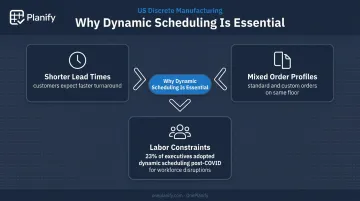
Each of these pressures demands a scheduler that responds to live floor conditions. The tools below were evaluated on exactly that: their ability to handle real-world manufacturing complexity, not general calendar management.
Best Dynamic Scheduling Software for Shop Floor Planning
These tools were assessed on finite capacity enforcement, setup sequencing, shift and labor constraints, dependency management, and disruption recovery. Here's how they compare.
OnePlanify
OnePlanify's Planify platform is a finite scheduling solution built specifically for manufacturing shop floors — the kind where setups, shift changes, and last-minute disruptions are the norm, not the exception. Its core positioning, "comprehensive finite scheduling, as easy to use as a spreadsheet," means real finite scheduling logic delivered without six-figure implementation costs or the 6–12 month deployment timelines that typically accompany enterprise APS platforms.
The scheduling engine handles every major constraint discrete manufacturers encounter — setup sequencing, shift calendars, multi-operation routing, dependency locks — while the interface wraps that logic in a spreadsheet-familiar workspace planners can operate on day one. The platform runs entirely in the browser with no on-premises installation required, and onboarding uses a small-batch, hands-on process designed to get planners running a live schedule within weeks.
For disruption scenarios, Planify's "Pretend mode" allows planners to model a machine breakdown or rush order, see which jobs slip and by how much, and compare multiple response options — all before committing a single change to the live schedule. Full-board replanning completes in seconds, with all setup times, shift calendars, and routing dependencies preserved automatically.
| Feature | Details |
|---|---|
| Key Features | Finite capacity scheduling; sequence-dependent setup and teardown modeling; 1st/2nd/3rd shift calendar management with overtime and holiday exceptions; multi-operation routing with predecessor locks; real-time disruption replanning with Pretend/Active mode; forward and backward scheduling; ERP integration via CSV, API, or database |
| Supported ERPs | Epicor, SYSPRO, IQMS/DELMIAWorks, Global Shop Solutions, JobBOSS, Infor, Odoo, NetSuite, SAP Business One |
| Deployment | 100% browser-based SaaS; no on-premise option; onboarding included in subscription |
| Pricing | Per-planner or per-work-center licensing; pricing by scoping conversation (currently in private beta) |
| Best Fit | Small-to-mid-size US and Canadian discrete manufacturers — job shops, machine shops, press shops, metal fabricators — who need real finite scheduling without enterprise implementation cost or complexity |
PlanetTogether
PlanetTogether is a US-based Advanced Planning and Scheduling platform built for mid-to-large manufacturers across aerospace, food and beverage, pharma, chemicals, discrete manufacturing, and several other verticals. Its primary strength is depth of constraint modeling across complex, multi-plant environments.
The platform supports finite-capacity planning against machines, labor, tools, materials, storage, and time — and offers what-if scenario modeling alongside its core scheduling engine. PlanetTogether's integration breadth is notable: the platform connects bi-directionally with SAP, Oracle, Microsoft Dynamics, NetSuite, Infor, Epicor, QAD, AVEVA, Plex MES, and others via APIs, middleware, Azure Data Factory, and iPaaS connectors.
The vendor uses "AI-ready" and "AI-enabled" language in its marketing, though specific machine-learning scheduling mechanisms aren't detailed in public product documentation. Capterra shows a 4.8/5 rating from 12 reviews (June 2026).
| Feature | Details |
|---|---|
| Key Features | Multi-plant finite capacity scheduling; what-if scenario modeling; bottleneck detection; delivery-date protection; broad ERP/MES integration; constraint modeling across machines, labor, tools, materials |
| Deployment | Cloud-based analytics confirmed; full deployment matrix not publicly documented |
| Pricing | Not publicly disclosed; demo/specialist contact required |
| Best Fit | Mid-to-large manufacturers with complex multi-site or multi-constraint environments running SAP, Oracle, or similar ERP systems |
Siemens Opcenter APS
Siemens Opcenter APS — originally developed as Preactor before Siemens acquired it in 2013 — is one of the longest-standing APS platforms in the market. It sits within Siemens' broader Opcenter Manufacturing Operations Management suite and the Xcelerator portfolio, integrating with Siemens' MES, quality, and manufacturing intelligence products.
The platform offers both Opcenter Planning (long-range, finite or infinite capacity) and Opcenter Scheduling (detailed sequencing against resources, materials, tooling, and workforce). A specialized Scheduling SMT variant handles electronics SMT line planning. Industries explicitly served include discrete manufacturing, consumer products, and regulated process environments. Siemens was named a Leader in the IDC MarketScape 2024–2025 Worldwide MES Vendor Assessment — though that recognition covers the broader Opcenter portfolio, not Opcenter APS specifically.
| Feature | Details |
|---|---|
| Key Features | Constraint-based finite and infinite scheduling; sequence optimization; bottleneck identification; Gantt-based visualization; MES/ERP integration; global implementation partner network; compliance and traceability features |
| Deployment | Standalone or integrated with ERP/MES; enterprise licensing model |
| Pricing | Not publicly disclosed; enterprise licensing structure |
| Best Fit | Large or enterprise manufacturers in automotive, aerospace, electronics, or regulated process industries needing deep configurability and global implementation support |
Katana MRP
Katana is a cloud-based manufacturing ERP and production scheduling platform built for small-to-mid-size manufacturers, particularly those in made-to-order, craft production, and e-commerce-adjacent environments. Its native integrations with Shopify, WooCommerce, BigCommerce, Amazon, eBay, QuickBooks Online, and Xero make it a natural fit for DTC brands managing manufacturing alongside multi-channel sales.
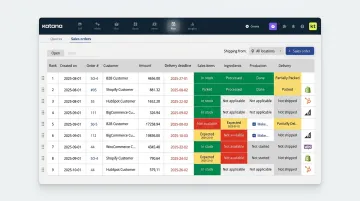
Katana's scheduling works through a visual drag-and-drop Make screen where planners reprioritize manufacturing orders and the system automatically recalculates ingredient reservations and production deadlines. This is priority-driven material allocation rather than a full multi-constraint finite capacity optimization engine — a key distinction for shops with complex routing or high changeover needs. Capterra shows 4.6/5 from 171 reviews (July 2026).
| Feature | Details |
|---|---|
| Key Features | Visual drag-and-drop scheduling board; automatic material allocation and priority-based sequencing; real-time inventory sync; live floor operations view; native e-commerce and accounting integrations |
| Deployment | Cloud SaaS |
| Pricing | Free (up to 30 SKUs); Core from $299/month; Advantage custom-priced |
| Best Fit | Small manufacturers, craft producers, and DTC brands with straightforward BOMs who need integrated scheduling and inventory management |
MRPeasy
MRPeasy is a cloud-based MRP and production scheduling solution targeting manufacturers with 10–200 employees. It packages finite capacity scheduling alongside MRP, inventory, CRM, and purchasing in a single platform — at a price point accessible to smaller shops transitioning off spreadsheets.
The platform documents finite-resource scheduling, Gantt chart views, click-and-drag manufacturing order rescheduling, workstation/resource management, and routing support. No mandatory implementation or training packages are required — a genuine differentiator for lean planning teams without dedicated implementation budgets. Capterra shows 4.5/5 from 169 reviews (June 2026).
| Feature | Details |
|---|---|
| Key Features | Finite capacity scheduling; production order Gantt charts; drag-and-drop rescheduling; workstation and routing management; MRP, inventory, CRM, and purchasing in one platform |
| Deployment | Cloud SaaS; self-implementation supported |
| Pricing | Starter $49/user/month; Professional $69; Enterprise $99; Unlimited $149 (annual billing: one month free) |
| Best Fit | Small manufacturers (10–200 employees) moving off spreadsheets who need an all-in-one MRP plus scheduling solution without a large implementation budget |
How We Chose These Tools
The evaluation focused on manufacturing-specific scheduling complexity — not generic workforce or field service scheduling. Each tool was assessed against the following criteria, tied to concrete business outcomes:
| Criterion | Why It Matters |
|---|---|
| Finite scheduling depth | Reduces unplanned overtime and missed due dates by respecting real capacity limits |
| Setup and sequence management | Directly impacts throughput in high-changeover environments |
| ERP/MES integration | Eliminates double-entry and data latency between planning and execution |
| Real-time disruption replanning | Determines how quickly the floor recovers from machine failures or rush orders |
| Ease of use | Shortens planner adoption time; undertrained planners revert to spreadsheets |
| Scalability | Supports growth without requiring a tool replacement |
| Vendor support quality | Critical for lean planning teams with limited internal IT resources |
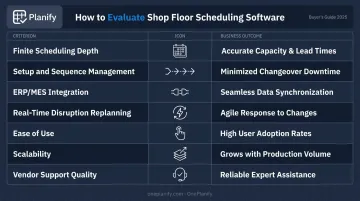
Each tool below is reviewed against these criteria so you can match the right fit to your shop's size, complexity, and growth stage.
Conclusion
Dynamic scheduling software is no longer optional for manufacturers competing on lead time and delivery reliability. The ability to automatically replan around machine breakdowns, rush orders, and shift gaps is a core operational requirement — not a feature upgrade.
The right tool must match the actual complexity of your shop. An enterprise APS platform won't serve a 40-person job shop any better than a spreadsheet will serve a multi-plant discrete manufacturer. Match the tool to your floor's actual constraints, not to a feature checklist.
Before committing to any platform, test it against a real scenario from your own production environment. How does it handle a sequence-dependent setup change? What happens when a machine goes down mid-shift? That test reveals more than any feature comparison chart.
For manufacturers who want genuine finite scheduling capability without enterprise complexity, OnePlanify is worth evaluating first. Built around real shop floor constraints — setups, shift calendars, routing dependencies, and disruption replanning — it runs in a browser that planners can operate from day one. You can request a scoping meeting to run it against your own work orders and see how it handles your specific scenario.
Frequently Asked Questions
What is dynamic scheduling?
Dynamic scheduling continuously adjusts production sequences in real time as conditions change — machine availability, operator shifts, new job priorities, or rush orders. Rather than fixing a plan at the start of the day, the system monitors live inputs and automatically revises the schedule throughout the shift.
What is the difference between finite and infinite scheduling in manufacturing?
Infinite scheduling (standard in most ERP/MRP modules) plans jobs without enforcing actual capacity limits, often producing unrealistic dates. Finite scheduling enforces real constraints — machine capacity, labor availability, setup times — to produce a schedule the floor can actually execute.
How does dynamic scheduling software handle shop floor disruptions?
When a disruption occurs, the software automatically re-sequences remaining jobs around the constraint, recalculates completion times, and surfaces the updated plan. Most platforms include manual override capability so planners can review impact and select the best response before committing changes.
Can dynamic scheduling software integrate with ERP systems?
Most dedicated APS and dynamic scheduling tools offer pre-built integrations with major ERP platforms. OnePlanify, for example, connects with Epicor, SYSPRO, NetSuite, SAP Business One, Infor, and others via CSV, API, or database connections — pulling work orders from ERP and dispatching confirmed schedules back.
What features should I look for in shop floor scheduling software?
Look for these non-negotiables:
- Finite capacity enforcement
- Sequence-dependent setup support
- Shift and calendar management
- Real-time rescheduling on disruption
- ERP integration
Ease of use is consistently underweighted in evaluations — but it's often the deciding factor in whether the tool gets used at all.
How is dynamic scheduling different from static scheduling?
Static scheduling fixes a production sequence at a set point in time and requires manual intervention to update when conditions change. Dynamic scheduling handles those updates automatically — no planner action needed when machine status shifts, labor changes, or a rush order lands.