Introduction
If your floor runs on a mix of tribal knowledge, morning huddles, and supervisors manually re-sorting the job queue — late orders and reactive firefighting are the predictable result. That's what operating without a detailed schedule looks like.
Detailed scheduling is the process of determining exactly when, where, and in what sequence each job runs — down to the machine, operator, and shift level. It's the most granular layer of production planning, and for shop floor managers in discrete and process manufacturing, it's the layer that determines whether orders ship on time.
This article is written specifically for shop floor managers — the people who need to know which job runs on which machine, in which sequence, and on which shift. Supply chain directors and ERP administrators have their own tools; this is for the floor.
What follows covers what detailed scheduling is, how it works, what drives it, and where it routinely breaks down.
Key Takeaways
- Detailed scheduling assigns specific start and finish times to every operation, on every resource, within a defined planning horizon.
- It sits below master scheduling, translating approved production plans into sequenced, executable work orders.
- Key inputs include machine availability, operator qualifications, setup times, shift calendars, and order priorities.
- Done correctly, it reduces idle time, minimizes setups, prevents bottlenecks, and improves on-time delivery.
- Finite scheduling — which enforces actual capacity limits — is the only approach that produces executable plans under real shop floor conditions.
What Is Detailed Scheduling?
A detailed schedule specifies the precise start time, end time, machine assignment, and operator assignment for every production operation — accounting for every available resource and constraint at a given moment.
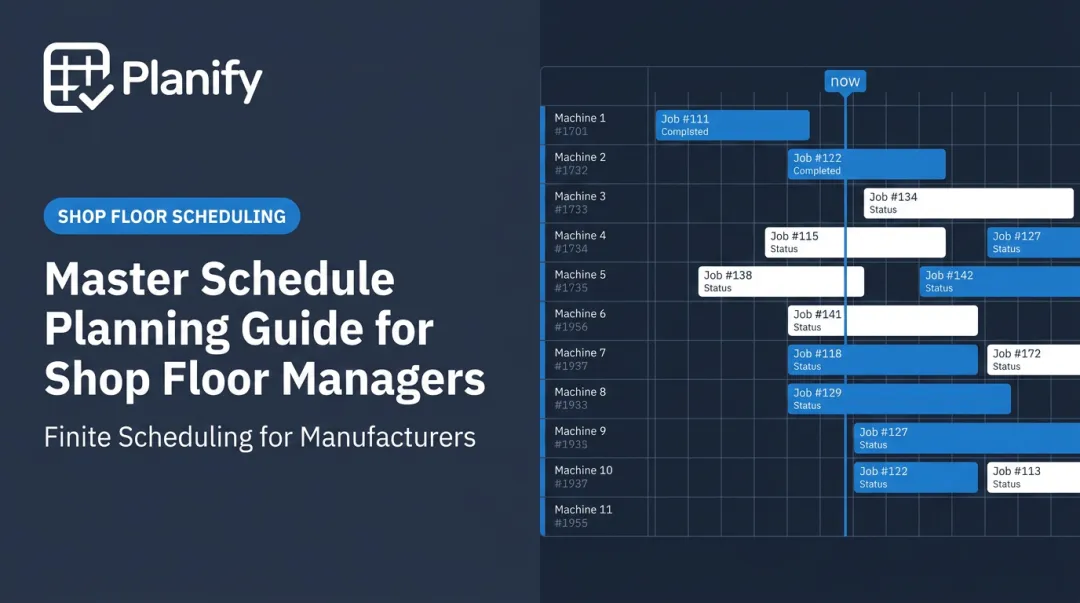
The output is a feasible, time-sequenced plan, typically visualized as a Gantt chart across machines or work centers. Every resource sees what to run, in what order, and when.
How It Fits Into the Planning Hierarchy
Most planning conversations involve three distinct levels:
| Level | Scope | Time Horizon |
|-------|-------|--------------|
| Master scheduling | What to make and when | Monthly / quarterly |
| Rough-cut capacity planning | Does capacity broadly exist? | Weekly |
| Detailed scheduling | Exact sequences, machines, operators | Daily / shift level |
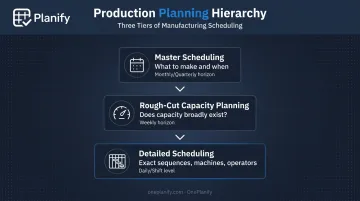
Master scheduling sets the intent. Rough-cut planning checks whether it's roughly feasible. Detailed scheduling is where those plans meet real constraints and get converted into something the floor can actually run.
A master schedule that says "Ship Order 4471 by Friday" tells you nothing about which machine it runs on, whether that machine is available, how long the setup takes, or which operator is qualified. That's the gap detailed scheduling closes — converting intent into an executable, shift-level plan.
Why Detailed Scheduling Matters on the Shop Floor
ERP systems plan at the order level. They know what needs to be made and when — but they typically have no awareness of machine setup sequences, shift breaks, shared tooling constraints, or operator qualifications by cell. That gap is where detailed scheduling lives.
When that gap goes unfilled, the floor operates on improvisation:
- Planners rely on memory and experience rather than documented constraints
- Supervisors manually re-sort the job queue each morning based on whoever showed up
- Bottlenecks surface without warning because no one modeled capacity accurately
- Delivery commitments get made without real visibility into floor load
According to a 2025 Deloitte survey of 600 US manufacturing executives, 46% reported moderate-to-significant difficulty filling planning and scheduling roles, and 35% ranked advanced production scheduling among their top two near-term investment priorities. The data reflects what floor managers already know firsthand.
A common example plays out like this: a shift lead receives a weekly schedule, exports it to Excel, manually reorders job priorities, and pushes assignments to tablets. It works — until it doesn't. Slow setups, equipment failures, material shortages, and workforce disruptions each invalidate the plan. With no mechanism to resequence, every unmodeled event silently delays the jobs behind it.
Those delays compound shift by shift, invisible to anyone outside the floor.
Detailed scheduling closes this gap by giving the floor a live, constraint-aware plan — one where delivery commitments reflect actual capacity, not optimistic assumptions.
How Detailed Scheduling Works: A Step-by-Step Breakdown
The process starts with approved work orders — routings, quantities, due dates — runs them through all relevant constraints, and produces a time-sequenced plan. That plan then gets updated continuously as conditions change. Here's how each step works in practice.
Step 1: Data Collection and Constraint Mapping
Before any sequencing can happen, you need accurate inputs:
- Open work orders with operation steps and standard times
- Machine and work center availability, including planned maintenance windows
- Operator shift calendars and qualification records by cell or machine type
- Material availability confirmations — jobs can't start if materials haven't been issued
- Setup matrices showing changeover times between job families
This is where most manual scheduling processes collapse. Stale or incomplete constraint data produces a schedule that looks clean when it's printed and falls apart within hours of hitting the floor. The schedule is only as good as the data it's built on.
Step 2: Sequencing, Prioritization, and Assignment
With constraints mapped, the scheduler evaluates the order queue:
- Jobs are ranked by due date, customer priority, or internal business rules
- Operations are assigned to the earliest available qualified resource
- Setup sequences are optimized — batching similar jobs together to minimize total changeover time
This is also where the finite vs. infinite scheduling distinction becomes operationally critical. Finite scheduling enforces hard capacity limits — two jobs cannot be scheduled on the same machine simultaneously. Infinite scheduling ignores capacity entirely, producing plans that appear clean on paper but require manual intervention before anything can actually run.
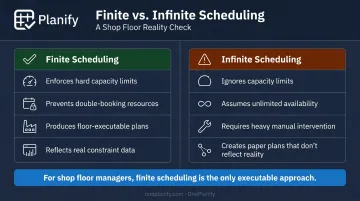
For shop floor managers, finite scheduling is the only approach worth using. OnePlanify's Planify is built for exactly this: forward and backward scheduling from due dates, sequence-dependent setup optimization, and shift-aware capacity enforcement — without needing an operations research specialist to run it.
Step 3: Release, Execution Monitoring, and Rescheduling
Once the schedule is released, work orders are dispatched to machine terminals or printed travelers. Operators confirm start and completion times. The scheduler monitors actuals against the plan.
Real-world conditions — machine breakdowns, material shortages, hot orders, absenteeism — guarantee the plan will need updating. The ability to resequence quickly and push changes back to the floor is what separates a live scheduling process from a static spreadsheet exercise. When replanning takes hours, operators stop trusting the schedule and start making their own priority calls — which defeats the purpose.
Key Factors That Affect Detailed Scheduling on the Shop Floor
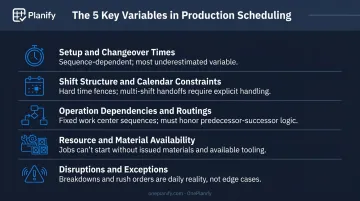
Five variables drive most of the complexity and most of the failures in shop floor scheduling:
- Setup and changeover times: Sequence-dependent setups are among the most underestimated scheduling variables. A schedule that ignores them may show 85% utilization on paper while achieving only 60% in practice.
- Shift structure and calendar constraints: Multi-shift environments create hard time fences. A job spanning two shifts requires explicit handling of handoff time, operator qualification overlap, and quality hold points — scheduling into a shift that doesn't exist produces plans foremen discard on arrival.
- Operation dependencies and routings: Parts travel through work centers in fixed sequences. Detailed scheduling must honor predecessor-successor relationships and account for interoperation move and queue times, or the paper sequence has no connection to what the floor actually runs.
- Resource and material availability: A perfectly sequenced job cannot start if its material hasn't been issued or its tooling is checked out to another cell. The schedule must connect to real-time inventory and tooling status to be executable.
- Disruptions and exceptions: Breakdowns, rush orders, quality holds, and operator no-shows are not edge cases — they are the daily reality. A schedule that can't absorb disruptions quickly becomes a hindrance; planners start working around it rather than from it.
The setup time problem is especially worth quantifying. NIST documented a Michigan machine shop that started with an 8-hour-20-minute changeover; a structured Kaizen event cut it by 70%, directly adding production capacity and reducing second- and third-shift lead-time pressure. That gap between planned and actual utilization doesn't resolve itself — it has to be built into the schedule from the start.
Common Misconceptions About Detailed Scheduling
"The ERP work order is the schedule"
ERP systems generate work orders with due dates — that's not the same as a detailed schedule. Most ERP scheduling modules assume infinite capacity, meaning they'll schedule more work on a machine than physically exists in a shift. They have no awareness of sequence-dependent setups, shift constraints, or real-time floor state. A detailed schedule translates ERP intent into floor-level reality. These are different things.
"A spreadsheet is good enough"
Spreadsheets work in simple, low-volume environments. They break down fast under constraint complexity. A spreadsheet cannot enforce finite capacity, cannot auto-resequence after a disruption, and cannot communicate changes to operators in real time.
Manufacturing Engineering documented exactly this failure mode: a machine shop using Excel as an intermediate scheduling layer produced schedules that became unreliable the moment any of the following occurred:
- A setup ran longer than planned
- A machine went down
- A material shortage hit the floor
OnePlanify targets exactly this gap. It sits between the limitations of Excel and the steep learning curve of traditional APS systems, applying finite scheduling logic inside an interface planners can work with from day one.
"Once the schedule is set, hold to it"
The value of a detailed schedule lies in how quickly it can be updated and re-optimized when conditions change — not in how polished it looks on day one. Managers who treat the schedule as a fixed document end up running the floor through expediting, verbal overrides, and reactive firefighting. The schedule becomes decoration. The real planning happens in hallways. That's a process problem, and the right scheduling tool is what makes dynamic replanning practical rather than theoretical.
Conclusion
Detailed scheduling converts high-level production plans into precise, constraint-aware, executable sequences. It gives every resource clarity on what to run next and gives managers early warning when capacity or timing is at risk.
The practical value comes from the process: collecting the right constraints, sequencing intelligently, releasing to the floor, and updating continuously as conditions change. That process requires a scheduling tool built for real shop floor complexity.
It needs to handle setups, shift calendars, routing dependencies, and disruption replanning without a six-month implementation or an operations research specialist to operate it.
OnePlanify's Planify platform does that for SMB manufacturers in the US and Canada. Finite scheduling with included small-batch onboarding means planners are running a live, constraint-aware schedule in weeks, not months into an implementation project.
Frequently Asked Questions
What is a detailed schedule?
A detailed schedule is a time-sequenced plan that assigns specific start and end times, machine assignments, and operator assignments to every production operation. It is the most granular level of production planning — a precise execution sequence across every resource, not just a target delivery date on a work order.
What is the L1, L2, L3, and L4 schedule?
These four levels organize production planning by granularity. L1 covers long-range strategic planning (annual/multi-year); L2 is the master production schedule (monthly/quarterly); L3 is department-level or rough-cut planning (weekly); L4 is the detailed schedule (daily/shift level). Shop floor managers work primarily at L4.
What is PPDS in SAP?
PP/DS (Production Planning and Detailed Scheduling) is a module embedded in SAP S/4HANA that handles constraint-based, finite-capacity scheduling at the operation level. It determines exact start and end times for operations, assigns work to resources, and can factor in setup times and costs, which makes it applicable to the detailed scheduling decisions shop floor managers face daily.
What is the difference between finite and infinite scheduling?
Finite scheduling respects actual resource capacity limits and will not place two jobs on the same machine simultaneously. Infinite scheduling ignores capacity entirely, assuming unlimited availability. Finite scheduling produces plans the floor can execute; infinite scheduling typically requires significant manual intervention before anything can run.
How often should a shop floor manager update the detailed schedule?
At minimum, review the schedule at the start of each shift and update it whenever a significant disruption occurs — machine downtime, urgent order insertion, or material shortage. In high-mix environments, near-continuous monitoring with rapid resequencing capability is the operational standard.