Managing a shop floor with multiple machines, shifting customer priorities, and sequence-dependent setups makes keeping these two processes aligned genuinely difficult. This article breaks down both, explains how they differ, how they connect, and what causes them to fail in practice.
Key Takeaways
- A production plan sets strategic targets; a schedule converts those targets into time-sequenced, resource-specific work orders
- Skipping from plan to execution without a detailed schedule causes resource conflicts and missed due dates
- Setup times, shift boundaries, and routing dependencies determine whether a schedule is actually executable
- Infinite capacity planning produces schedules that look good on paper but collapse under real shop floor conditions
- Finite capacity scheduling models real constraints from the start, keeping plans executable as shop floor complexity grows
What Are Production Plans and Production Schedules?
These two terms get used interchangeably, but they operate at completely different levels of the manufacturing process.
The Production Plan
A production plan is a document capturing what products need to be made, in what quantities, and within what timeframe. It's derived from demand forecasts, customer orders, and inventory targets. As a 2023 peer-reviewed review in production planning research describes it: production planning uses existing resources to meet demand as effectively and profitably as possible, operating at a tactical, medium-range level — typically covering weeks to months.
A production plan answers: "We need to produce 500 units of Product A this week."
The Production Schedule
A production schedule is the granular, time-ordered sequence of manufacturing tasks assigned to specific machines, workstations, and workers. It specifies start times, end times, run sequences, setups, and dependencies. It operates at the operational level — covering hours, shifts, or days.
A production schedule answers: "Job #A1 runs on Machine 3 from 8am–11am Tuesday, following a 45-minute setup after Job #B2."
The distinction is practical: a plan without a schedule leaves capacity unallocated, sequences undefined, and delivery dates unenforceable.
How They Connect — and Where the MPS Fits
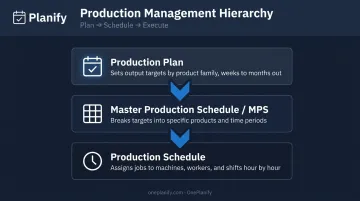
Between the plan and the schedule sits the Master Production Schedule (MPS) — a time-phased layer that translates aggregate demand targets into product-level production quantities by time period. The MPS sits after the aggregate plan but before the detailed job-shop schedule, serving as the handoff between what needs to be built and how the shop floor will build it.
To summarize how the three levels relate:
- Production Plan — sets output targets by product family, weeks to months out
- Master Production Schedule (MPS) — breaks targets into specific products and time periods
- Production Schedule — assigns jobs to machines, workers, and shifts at the hour-by-hour level
Why Manufacturers Rely on Production Plans and Schedules
The Cost of Operating Without One
When manufacturers operate without formal planning and scheduling, the consequences show up fast: resource conflicts between jobs, idle workers waiting on materials, over-allocated equipment, and last-minute scrambles that cost real money.
NIST's Economics of Manufacturing Machinery Maintenance report estimated that in 2016, US discrete manufacturers absorbed $18.1 billion in downtime losses and over $100 billion in lost sales from delays and defects — losses largely traceable to unplanned, reactive conditions rather than managed production environments.
What Makes Scheduling Non-Negotiable
Those losses aren't random. Manufacturing creates coordination challenges that informal, ad hoc approaches simply can't handle at scale:
- High capital equipment costs — idle machines are expensive; overloaded ones create bottlenecks
- Multi-step production dependencies — Op 20 can't start before Op 10 finishes
- Perishable or time-sensitive materials require precise production timing to avoid waste
- Shift-based labor — scheduling as if the floor runs 24/7 produces unworkable plans
- Customer lead time commitments — missed dates damage relationships and revenue
In regulated industries, structured planning isn't just best practice — it's required. FDA CGMP regulations (21 CFR 211.186) mandate dated and signed master production and control records for drug products, with batch production records documenting each significant manufacturing step — turning scheduling from a best practice into a compliance obligation.
How Production Planning and Scheduling Works End-to-End
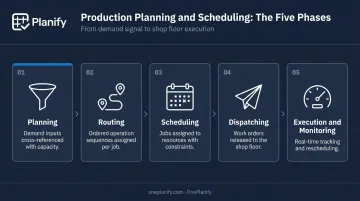
The process runs from demand signal to shop floor execution across five stages: planning, routing, scheduling, dispatching, and execution/monitoring. Each stage narrows the scope from strategic to operational.
Phase 1: Planning and Routing
Production planning begins with demand inputs — forecasts, customer orders, inventory levels — cross-referenced against capacity: available labor, equipment, and materials. The output is a realistic picture of what can actually be produced.
Routing then translates that plan into physical execution paths. As NIST defines it, a routing is an ordered list of job steps a load follows to become a finished product, with each step specifying a machine-resource family and estimated processing time.
For a machine shop, that sequence might look like: Op 10 (Mill) → Op 20 (Weld) → Op 30 (Finish).
Phase 2: Scheduling and Dispatching
With routing defined, raw production targets get converted into a time-sequenced schedule. Each job is assigned to a specific resource with all constraints accounted for:
- Start and end times for each operation
- Setup times between runs
- Shift boundaries and calendar constraints
- Task dependencies across operations
Dispatching is the act of releasing work orders to the floor — packaging the schedule into a chronological production-order list for each resource so workers know what to do and when. According to NIST's production management model, the dispatcher converts the schedule into per-resource lists and sends them to the appropriate workstation; machine dispatch lists determine the next load.
Phase 3: Execution, Monitoring, and Adjustment
Once the schedule is live, shop floor monitoring tracks work-in-progress against plan. Deviations — a machine breakdown, a material shortage, an operator absence — require rescheduling.
This is the phase most planning tools neglect. A schedule that cannot be adjusted in real time is effectively useless in most manufacturing environments. Replanning quickly — while preserving setup, shift, and dependency constraints — is what keeps production on track when conditions change.
Key Factors That Affect Production Plans and Schedules
Not all constraints are created equal. Some live at the planning level; others only surface once scheduling begins.
Planning-Level Inputs
- Demand forecast accuracy — forecast errors directly increase total cost and MPS instability
- Equipment and labor availability — what's actually available, not what's theoretically possible
- Material and component lead times — long lead times shrink the window for reactive scheduling
- Product complexity and routing length — a review of 93 studies found product complexity consistently associated with worse cost, time, quality, and delivery performance
Shop Floor-Level Constraints
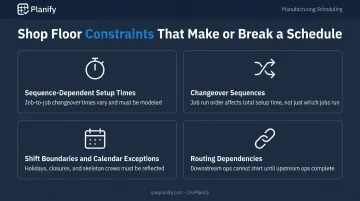
These are what high-level planning tools most often ignore — and what determine whether a schedule is actually executable:
- Sequence-dependent setup times — changing from Job A to Job B may take 45 minutes; Job A to Job C may take 15. Scheduling through this without modeling it creates plans that show 85% utilization on paper but run at 60% in reality
- Changeover sequences — the order in which jobs run matters, not just which jobs run
- Shift boundaries and calendar exceptions — holidays, weekend closures, and skeleton crews must be accounted for
- Routing dependencies — downstream operations cannot start until upstream operations complete
Scale and Product Mix
A single-product facility with stable demand has straightforward scheduling needs. A job shop running dozens of SKUs across shared equipment faces a combinatorial problem. Industrial job-shop instances can reach 1 million operations across 1,000 machines — before factoring in sequence-dependent setups or machine flexibility. At that scale, spreadsheets break down. Finite capacity scheduling tools exist specifically to handle this kind of complexity.
Common Issues and Misconceptions About Production Plans and Schedules
Misconception 1: The Plan and the Schedule Are the Same Thing
Teams that skip from production plan to execution — without a detailed schedule — almost always hit resource conflicts, unexpected bottlenecks, and missed due dates. The plan says what to produce. Without the schedule, no one has figured out the real-time sequencing of jobs across constrained equipment. That gap shows up on the floor, not on paper.
Misconception 2: Infinite Capacity Planning Is Close Enough
Planning as if all machines are always available and all labor is always present produces schedules that are technically valid on paper but impossible to execute in practice. Machine downtime, operator absences, and setup times make infinite capacity planning unrealistic for most manufacturers.
As the Cambridge Institute for Manufacturing defines it, infinite-capacity scheduling works backward from customer due dates and then tries to reconcile the result with capacity afterward. Capacity conflicts surface after the schedule is built, not before. Finite scheduling considers available capacity from the start.
Misconception 3: Spreadsheets Can Handle Real Scheduling
Spreadsheets are the default for many small and mid-size manufacturers — and they work, until they don't. The fundamental problem is that spreadsheets cannot simultaneously model setup sequences, shift boundaries, and job dependencies in a dynamic, constraint-aware way.
OnePlanify's Planify is built around this constraint. It handles sequence-dependent setup times, shift-aware calendaring, and multi-operation routing dependencies in a browser-based interface planners can use from day one — no months-long implementation required.
When a machine breaks down, Planify replans the entire board in seconds. Its "Pretend Mode" lets planners model a disruption first, see which orders slip and by how much, then commit the new plan once they've picked the best response.
Misconception 4: A Schedule Guarantees On-Time Delivery
Having a schedule doesn't guarantee on-time performance. Schedules must be realistic from the start, monitored during execution, and adjusted when conditions change. Teams that publish a schedule and move on are caught off-guard by disruptions that were entirely avoidable — or would have been, with a tool that supports real-time rescheduling.
Frequently Asked Questions
What is the difference between a production plan and a production schedule?
A production plan defines what to produce, in what quantities, and over what timeframe — driven by demand forecasts and capacity assessment. A production schedule is the granular, time-sequenced assignment of those jobs to specific machines, workers, and shifts that makes the plan executable on the shop floor.
What is scheduling in production planning?
Scheduling is the stage where abstract targets — "produce 300 units this week" — get converted into a specific, time-ordered sequence of operations assigned to named resources: who does what, on which machine, and when.
What does a production schedule include?
A production schedule typically includes job or work order identifiers, assigned machines or workstations, start and end times, setup and run times, operator assignments, material requirements, task dependencies, due dates, and priority levels. More structured schedules (such as ISA-95-based systems) also capture earliest-start and latest-end windows and personnel/equipment requirements per operation.
What is finite capacity scheduling?
Finite capacity scheduling builds production schedules based on the actual, limited availability of machines, labor, and materials — unlike infinite capacity scheduling, which ignores those constraints. The result is a schedule that prevents overload by design: realistic and executable, not just theoretically sound.
What happens when there is no production schedule?
Without a schedule, the typical outcomes are: resource conflicts between jobs competing for the same machine, machine idle time or overloading, missed delivery commitments, reactive firefighting instead of proactive planning, and an inability to accurately quote lead times to customers. The floor runs on whoever shouts loudest rather than on a coherent plan.