Introduction
Producing the right products, on time, without wasting machines or labor — that's the promise of manufacturing. Production scheduling is what makes it executable.
Many operations managers treat scheduling as an extension of planning, or worse, as something that happens informally on a whiteboard or in a spreadsheet. When it works, nobody notices. When it breaks down, the results are immediate: missed shipments, idle operators waiting for instructions, machines sitting between jobs while planners scramble to reprioritize.
According to a 2020 NIST study, unplanned downtime alone accounts for $18.1 billion in annual losses across U.S. discrete manufacturing. That's not a technology problem. It's a scheduling and maintenance discipline problem.
This guide is written for manufacturing operations managers, production planners, and shop floor supervisors. It covers what scheduling is, how it works in practice, and what separates a schedule the floor can actually run from one that falls apart by mid-shift — including sequencing logic, capacity constraints, disruption handling, and when software makes the difference.
Key Takeaways
- Production scheduling converts a high-level production plan into a time-ordered, resource-assigned sequence of shop floor tasks
- Scheduling is operational and short-term; planning is strategic and medium-to-long-term — two distinct disciplines with different horizons
- Effective scheduling requires modeling real constraints: setup times, shift patterns, routing dependencies, and material readiness
- Finite capacity scheduling — not infinite — produces schedules the shop floor can actually execute
- A schedule that isn't actively maintained breaks down within hours of a shift starting
What Is Scheduling in Production Planning?
Production scheduling is the process of assigning specific start times, end times, sequences, and resources to manufacturing work orders within a defined planning horizon — typically days to weeks. The output is not a plan on paper. It's an ordered, time-stamped sequence of operations that machines and operators can follow.
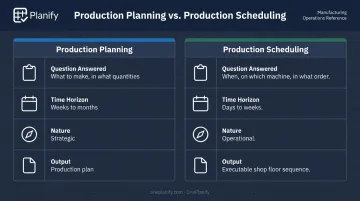
The distinction between planning and scheduling matters, and it's a source of persistent confusion on manufacturing teams:
| Production Planning | Production Scheduling | |
|---|---|---|
| Question answered | What to make, in what quantities | When exactly, on which machine, in what order |
| Time horizon | Weeks to months | Days to weeks |
| Nature | Strategic | Operational |
| Output | Production plan | Executable shop floor sequence |
In practice, this division of labor shows up in how scheduling tools like OnePlanify's Planify platform work: the ERP holds the production plan — work orders, routings, materials — while the scheduling layer takes those work orders and sequences them against real, finite capacity constraints. The goal, as OnePlanify puts it, is "a schedule you publish that the shop floor can actually run — not a spreadsheet ideal."
Why Production Scheduling Matters for Manufacturers
Without a structured schedule, manufacturers can't reliably meet delivery promises, prevent idle time, or detect bottlenecks before they cascade into delays. NIST estimates unplanned downtime costs US manufacturers billions annually — but the operational picture is equally telling.
What an Unscheduled Shop Floor Looks Like
When scheduling is informal or absent, the shop floor defaults to firefighting:
- Operators waiting at work centers for jobs that haven't been prioritized
- Multiple supervisors claiming priority on the same machine at the same time
- Material shortages discovered mid-run rather than identified in advance
- Rush orders exploding the informal queue and invalidating whatever plan existed
Each of these incidents compounds. A machine that sits idle for two hours doesn't just cost two hours — it shifts the completion of every downstream job and creates a ripple of missed commitments.
Is Scheduling a Compliance Requirement?
Regulated manufacturers often ask whether a production schedule is legally required. The major standards address related requirements — but none mandate a standalone schedule outright:
| Standard | Industry | What It Requires |
|---|---|---|
| 21 CFR Part 211 | Pharmaceuticals | Controlled procedures, contemporaneous records, documented process parameters |
| 21 CFR Part 117 | Food processing | Controlled production procedures and process documentation |
| IAQG 9100 | Aerospace | Operational planning and control to support on-time delivery (certification standard, not statute) |
Scheduling isn't universally mandated by law, but it's a fundamental operational requirement for any manufacturer juggling more than a handful of simultaneous jobs. Regulated environments simply make the cost of poor scheduling visible faster — through audit findings, batch failures, or delivery penalties.
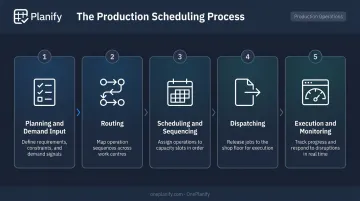
How the Production Scheduling Process Works
A production schedule takes inputs — demand requirements, resource availability, material readiness, work-in-progress — and produces an ordered, time-stamped sequence of operations. Gartner describes detailed manufacturing scheduling as determining specific activities, sequences, links, resources, utilities, materials, and time required for work orders, with outputs covering horizons from seconds to weeks.
The process is not static. Schedules must be continuously updated in response to machine breakdowns, rush orders, material delays, and shift changes.
Step 1: Planning and Demand Input
Scheduling begins with confirmed inputs from the production plan: what needs to be made, in what quantities, and by when. Before a single job gets sequenced, the schedule needs verified inputs across three areas:
- Material availability: confirmed stock or inbound supply dates
- Labor headcount: which shifts are staffed and at what capacity
- Equipment readiness: which machines are operational and available
A schedule built on assumptions about any of these will fail on the floor within hours.
Step 2: Routing
Routing maps each job through its required sequence of operations and work centers — determining which machine or workstation handles each step and in what order. For a machined part, that might be mill → bore → finish. Each step must be mapped before the schedule can be built.
Step 3: Scheduling and Sequencing
This step translates the routing into a live schedule. Specifically, it:
- Assigns start and end times to each operation
- Sequences jobs across machines to minimize idle time and setup changes
- Ensures no resource is double-booked or overloaded
This is where finite vs. infinite capacity decisions become real.
Step 4: Dispatching
Dispatching releases work orders and instructions to the shop floor: job tickets, machine assignments, material movement instructions. This is the point where the schedule transitions from a plan into active operator tasks.
Step 5: Execution and Monitoring
Execution is the ongoing tracking of actual progress against the schedule. It includes identifying deviations early, adjusting priorities when disruptions occur, and feeding real-time status back into the schedule for the next planning cycle. Without active monitoring, disruptions accumulate undetected until they become delays the schedule can't absorb.
Types of Production Scheduling Methods
No single scheduling method fits every manufacturer. The right choice depends on whether the priority is resource utilization, on-time delivery, or responsiveness to disruption.
Forward Scheduling
Jobs are sequenced from the earliest possible start date forward. This approach maximizes resource utilization and builds natural buffer time, making it well-suited for stable, predictable demand environments where flexibility matters more than deadline precision.
Backward Scheduling
Scheduling works backward from the customer delivery due date. Each preceding operation is timed to meet the deadline. This is the right default for manufacturers where on-time delivery is the primary constraint. When the due date is non-negotiable, backward scheduling tells you exactly when each step must start.
Finite Capacity Scheduling
Jobs are scheduled only when the required machine, labor, and material are genuinely available. The schedule reflects real-world constraints rather than theoretical capacity. For complex shop floors running multiple concurrent jobs, this approach produces schedules the floor can actually execute without manual correction.
OnePlanify is built on this model, applying forward and backward scheduling within a constraint-aware framework that accounts for setup times, shift calendars, routing dependencies, and disruption replanning simultaneously.
Infinite Capacity Scheduling
Schedules against assumed unlimited capacity. Useful for initial planning and capacity analysis, but not directly executable on a constrained shop floor without further refinement. Most ERP scheduling modules default to this approach — which is why their outputs often require significant manual adjustment before the floor can use them.
Two additional methods operate at a higher planning level rather than the execution layer:
Master Production Scheduling (MPS)
MPS sits above the detailed scheduling layer and coordinates production across multiple product lines over a medium-term horizon. It's most relevant for high-volume manufacturers managing many SKUs simultaneously.
Just-in-Time (JIT)
JIT triggers production from actual customer demand rather than forecasts, minimizing inventory by synchronizing production with consumption. It's most commonly applied in automotive and high-volume discrete manufacturing environments with stable, predictable demand.
Key Factors That Affect Production Scheduling on the Shop Floor
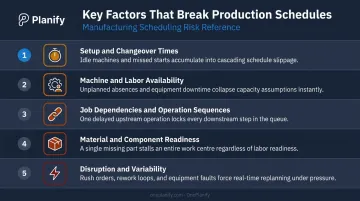
The following factors are consistently underestimated in scheduling design. Each one, if ignored, will cause the schedule to fail on the floor regardless of how well it was constructed on paper.
Setup and changeover times: Transition time between job types is routinely ignored — a schedule showing 85% utilization on paper can deliver only 60% in reality when changeover isn't modeled. Sequence-dependent setups (Job A → Job B ≠ Job A → Job C) must be explicitly built into the schedule for press shops, machine shops, and CNC environments.
Machine and labor availability: Schedules must reflect actual shift patterns, planned maintenance windows, and per-work-center capacity — not assumed 24/7 availability. NIST data shows top-quartile reactive maintenance reliance produces 3.3× more downtime, with reactive maintenance causing 31.7% of all downtime.
Job dependencies and operation sequences: Operations that can't start until a prior step completes must be explicitly modeled. A routing that lets Op 20 begin before Op 10 finishes isn't just wrong in theory — it's a schedule your foremen will ignore.
Material and component readiness: A schedule is only executable if materials are on hand when each operation starts. Scheduling must sync with procurement and inventory status — not run in isolation. OnePlanify addresses this by pulling work orders directly from the ERP, where upstream material release logic is already applied.
Disruption and variability: Rush orders, breakdowns, scrap, absent operators — disruption is constant. The schedule needs a defined resequencing protocol for when reality deviates from the plan. OnePlanify's "Pretend mode" lets planners model a disruption, see which orders slip, and test responses before committing — in minutes, not hours.
Common Production Scheduling Mistakes and Misconceptions
Treating the Schedule as Static
The most damaging assumption in production scheduling is that a schedule, once created, is a fixed document. In practice, a schedule that isn't actively maintained becomes misleading noise within hours of a shift starting. Machine breakdowns, material delays, and operator absences aren't exceptional events. They're the normal operating environment. A scheduling process without defined disruption protocols isn't a scheduling process — it's a wish list.
Underestimating the Complexity of Spreadsheets
Many manufacturers attempt to manage multi-machine, multi-job scheduling in Excel or on whiteboards. This isn't a failure of effort — spreadsheets simply weren't built for real-time constraint management. Under normal conditions, they can't model sequence-dependent setup times or enforce routing dependencies. Under pressure, when a disruption requires rapid resequencing, manual replanning drops constraints and burns hours.
Deloitte's 2025 Smart Manufacturing Survey found that 35% of manufacturing executives ranked advanced production scheduling as their top or second-highest system-investment priority for the next two years. The industry is catching up to a gap that shop floors have felt for years.
Using Infinite Scheduling Outputs Directly on the Floor
Teams that take MRP or ERP scheduling outputs, built on infinite capacity assumptions, and run them directly on the shop floor aren't scheduling. They're setting aspirational timelines.
Infinite capacity outputs require conversion into finite, executable schedules before the floor can use them. Skipping that step leads to:
- Chronic overcommitment against real machine capacity
- Bottlenecks that compound across shifts
- A recurring blame cycle when delivery promises consistently miss
Conclusion
Production scheduling is the operational backbone that converts a strategic production plan into shop floor action. It assigns time, sequence, and resources to every job in a way that reflects real constraints — not theoretical capacity.
The gap between manufacturers who meet delivery promises consistently and those who firefight constantly usually comes down to whether their scheduling process accounts for the full complexity of the shop floor: setups, shift changes, routing dependencies, and disruptions. Getting that right requires both the right process and the right tools.
OnePlanify's Planify is built specifically for this. It handles finite scheduling across the full constraint set — shift calendars, changeover sequences, multi-operation routing, and rapid disruption replanning — without requiring specialist training to operate.
For manufacturers currently working through spreadsheets or ERP modules that assume infinite capacity, Planify bridges the gap between those two inadequate tools. The result is executable finite scheduling logic that production planners can actually use day-to-day, as easy to navigate as a spreadsheet but built for the messy reality of the shop floor.
Frequently Asked Questions
What is scheduling in production planning?
Scheduling in production planning is the process of assigning specific times, sequences, and resources to manufacturing tasks so they execute in the right order at the right time. It converts a high-level production plan into a shop floor sequence with defined start and end times for each operation.
What is the difference between production planning and production scheduling?
Production planning is strategic — it determines what to make and in what quantities over a medium-to-long time horizon. Production scheduling is operational — it determines exactly when each job runs, on which machine, and in what order. Planning defines the targets; scheduling determines how and when to hit them.
What are the main types of production scheduling methods?
The four primary methods are forward scheduling (starts from earliest availability), backward scheduling (starts from the due date), finite capacity scheduling (constrained by real resources), and infinite capacity scheduling (assumes unlimited capacity). Most complex shop floors rely on finite scheduling to produce executable plans.
What is finite capacity scheduling and why does it matter for manufacturers?
Finite capacity scheduling only assigns work when the required machine, labor, and materials are actually available. Unlike infinite scheduling, it produces a plan that is realistic and executable — not just one that looks correct on paper. This makes it the standard approach for manufacturers running multiple concurrent jobs on constrained equipment.
How often should a production schedule be updated?
In active manufacturing environments, schedules typically need review and updating at least daily. In high-variability shops, more frequent updates are necessary because machine downtime, material delays, and rush orders can invalidate a static schedule within hours of a shift starting.